


An Introduction to the JavaScript PDF Generation Library: PDF-lib
If you're looking for a way to generate PDFs in your Node.js project, PDF-lib is a lightweight, JavaScript-based library that might catch your attention. However, before you dive in, it's essential to assess whether its capabilities align with your needs, especially when working with HTML to PDF conversions for SaaS reports.
You can check our the full documentation here.
Alternative PDF Libraries: How PDF-lib Compares to Other Tools
While PDF-lib offers a simple, JavaScript-based solution for PDF creation, it does come with limitations.
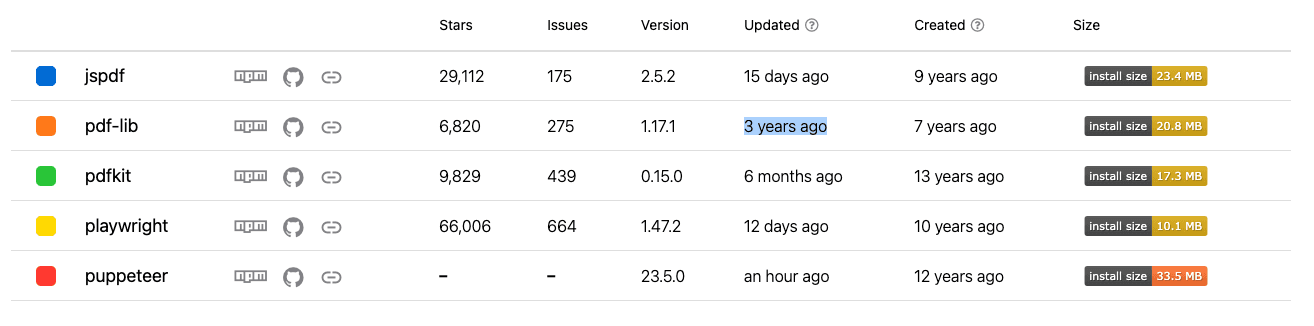
For one, it hasn’t been updated in over three years, according to npm, which raises concerns about long-term support and security. You should tread cautiously when incorporating it into production environments. Alternatives like Puppeteer or Playwright offer more feature-rich, modern support, leveraging browser engines for precise HTML rendering. Though these tools can be more resource-intensive, they ensure better HTML to PDF conversions. PDF-lib’s strength lies in its control and customization but lacks the robust, out-of-the-box HTML rendering you might need for complex layouts.
If you want to dig deeper on a comparison between playwright and other javascript pdf libraries, we also have a detailed article with a full comparison between the best PDF libraries for NodeJs in 2025.
Getting Started with PDF-lib: Setting Up Your Node.js Environment
To get started with PDF-lib, first install it using npm:
npm install pdf-libImport the library and start with a basic example:
const { PDFDocument } = require("pdf-lib");
const pdfDoc = await PDFDocument.create();
const page = pdfDoc.addPage([600, 400]);
page.drawText("Hello World");
const pdfBytes = await pdfDoc.save();
This setup demonstrates how easy it is to create a basic PDF using PDF-lib. However, for developers looking to convert HTML to PDF, the manual process of rendering HTML elements individually will quickly become cumbersome, especially when dealing with complex layouts.
Key Features of PDF-lib for Developers
PDF-lib’s API is designed with developers in mind, offering intuitive methods for manipulating PDFs. Some of the core capabilities include:
1. Creating a new PDF document:
const pdfDoc = await PDFDocument.create();
const page = pdfDoc.addPage([600, 400]);
page.drawText("Hello World");
const pdfBytes = await pdfDoc.save();
2. Modifying existing PDFs:
const existingPdf = await fetch("path/to/existing.pdf").then((res) =>
  res.arrayBuffer()
);
const pdfDoc = await PDFDocument.load(existingPdf);
const pages = pdfDoc.getPages();
pages[0].drawText("Modified Text");
const pdfBytes = await pdfDoc.save();Converting HTML to PDF: Practical Implementation with PDF-lib
While PDF-lib doesn't directly parse HTML, you can manually map HTML content into its PDF creation methods. For example, if you're generating an invoice, you can create an HTML template and extract the necessary content to render it in your PDF:
<!DOCTYPE html>
<html>
<head>
  <style>
    .invoice { width: 600px; margin: 0 auto; }
    .header { background-color: #f2f2f2; padding: 10px; text-align: center; }
    .details { padding: 10px; }
  </style>
</head>
<body>
  <div class="invoice">
    <div class="header">
      <h1>Invoice</h1>
    </div>
    <div class="details">
      <p>Client: John Doe</p>
      <p>Total: $500</p>
    </div>
  </div>
</body>
</html>
To replicate this in PDF-lib, you'd need to manually position each element:
page.drawText("Invoice for John Doe", { x: 50, y: 700 });
page.drawText("Total: $500", { x: 50, y: 650 });
This approach works for simple layouts but requires meticulous handling for more complex HTML structures.
Advanced Techniques: Enhancing PDF Reports with PDF-lib
If you're looking to add more functionality to your PDFs, PDF-lib allows for embedding images and fonts, enabling a more customized PDF generation. For example, embedding an image:
const imageBytes = await fetch("path/to/image.png").then((res) =>
  res.arrayBuffer()
);
const image = await pdfDoc.embedPng(imageBytes);
page.drawImage(image, { x: 50, y: 500 });
Integrating with a PDF API
For SaaS platforms, automating PDF generation at scale might require offloading the heavy lifting to a PDF API. By integrating APIs like pdf noodle you can handle high-volume PDF generation, complex formatting, and post-processing, all from a single backend call.
fetch("https://api.pdfnoodle.com/v1/pdf/sync", {
  method: "POST",
  body: JSON.stringify({
    templateId: "your-template",
    data: { html: "your-html" },
  }),
  headers: { Authorization: "Bearer your-api-key" },
});
These APIs handle HTML to PDF conversion more efficiently than jsPDF for large-scale, complex use cases.
Alternative: Convert HTML to PDF Using pdf noodle

Managing HTML-to-PDF conversion at scale can quickly become a nightmare!
Especially in serverless environments where cold starts, memory limits, and headless browser quirks love to break at the worst possible time (we even wrote a full article about it). Add constant template iterations, version control headaches, and the need to support non-technical contributors, and suddenly your “simple PDF library” turns into an ongoing engineering project.
pdf noodle eliminates all of that.
Instead of maintaining brittle infrastructure or wrestling with outdated pdf libraries, pdf noodle gives you a battle-tested PDF generation API that just works!
Fast, scalable, and designed for both developers and non-developers. You send raw HTML or use our AI-powered template builder, and pdf noodle handles the rendering, scaling, optimization, and delivery so your team doesn’t have to.
Here's an example of a simple API request to generate your pixel-perfect PDF with just a few lines of code:
fetch('https://api.pdfnoodle.com/v1/html-to-pdf/sync', {
  method: 'POST',
  body: JSON.stringify({ html:'your-html' } }),
  headers: { 'Authorization' : 'Bearer your-api-key' }
});
pdf noodle also includes a powerful AI Agent that can generate PDF templates instantly, along with a modern editor for refining the design, also using AI, to match your brand. You don't need developing or design experience to quickly update layouts, adjust styling, and manage template versions.
Here’s a quick demo showing how it works:
You can create your account and design your first template without any upfront payment.
Conclusion
While PDF-lib is lightweight and offers a high level of control, its lack of updates over the past few years and low-level API may not make it the best fit for more advanced HTML to PDF use cases.
For developers seeking a more seamless solution, modern libraries like Playwright or Puppeteer provide better HTML rendering capabilities.
If you don't want to waste time maintaining pdfs layouts and their infrastructure or if you don't want to keep track of best practices to generate PDFs at scale, third-party PDF APIs like pdf noodle will save you hours of work and deliver a high quality pdf layout.
Try it yourself: Need a quick conversion without writing code? Use our free HTML to PDF conversion tool — no signup required.


