


Overview: Top PDF Libraries Node JS 2025
This article explores the top PDF libraries for Node.js in 2025, including browser-based tools, non-browser-based solutions, and third-party APIs. Whether you’re generating HTML-to-PDF documents, creating PDFs programmatically, or looking for scalable third-party services, this guide covers the best libraries available for developers.
Browser-Based PDF Libraries That Convert HTML to PDF
Browser-based libraries leverage headless browsers or APIs to convert HTML to PDF, offering accurate rendering of CSS, images, and layouts.
Benefits of Browser-Based Libraries
- High Fidelity: Outputs PDFs that closely match the source HTML.
- Dynamic Rendering: Supports JavaScript execution for interactive pages.
- Reusable Templates: Leverages existing HTML and CSS designs for PDF creation.
Cons of Browser-Based Libraries
- Performance Overhead: Resource-intensive due to browser emulation.
- Setup Complexity: Requires additional dependencies like headless browsers.
Libraries: Puppeteer, Playwright
If you're focusing on converting HTML to PDF using NodeJS, we have an full articles focused on that.
Non-Browser-Based PDF Libraries for Generating PDFs With Canvas API
Non-browser-based libraries use APIs like canvas or PDFKit to generate PDFs programmatically. These are lightweight and optimized for server-side environments.
Benefits of Non-Browser-Based Libraries
- Performance: Optimized for speed and efficiency.
- Server-Side Independence: Doesn’t rely on browser rendering.
- Customizability: Provides granular control over PDF content and structure.
Cons of Non-Browser-Based Libraries
- Manual Effort: Requires explicit layout and style definitions.
- Limited Styling: Lacks advanced CSS rendering capabilities.
Libraries: jsPDF, PDFKit, pdfMake, pdf-lib, React-PDF
Third-Party PDF Generation API Solutions
Third-party APIs such as pdf noodle integrate easily with existing code bases and scale to large volume pdf generation. They reduce infrastructural strain and provide easy ways to embed dynamic data into HTML or no-code templates, making them ideal for projects requiring robust collaboration or custom branding.
Benefits of Third-Party APIs
- Scalability: Ideal for handling large-scale document generation.
- Advanced Features: Includes templates, no-code builders, advanced components and interactive PDFs.
- Ease of Integration: Provides simple APIs for faster implementation.
Cons of Third-Party APIs
- Cost: Often requires a subscription or licensing fees.
- Dependency: Relies on external infrastructure for functionality.
In-Depth Look at Top PDF Libraries Node JS 2025
Generating PDFs With Puppeteer
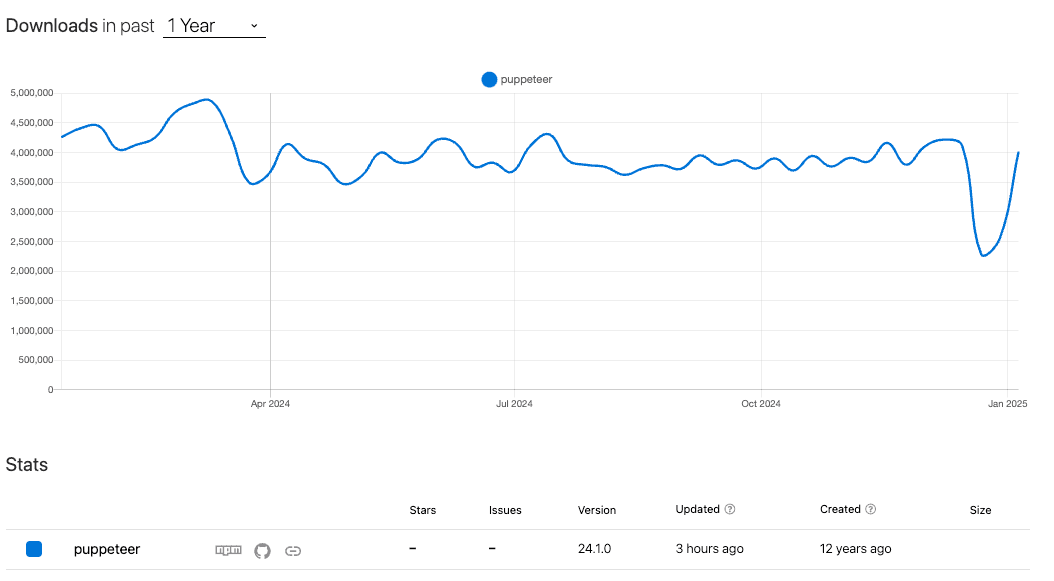
Puppeteer is a headless browser library that excels at HTML-to-PDF conversion, supporting CSS and JavaScript rendering.
Installation:
npm install puppeteerCode Example:
const puppeteer = require("puppeteer");

(async () => {
  const browser = await puppeteer.launch();
  const page = await browser.newPage();
  await page.setContent("<h1>Invoice</h1><p>Customer: John Doe</p>");
  await page.pdf({ path: "invoice.pdf", format: "A4" });
  await browser.close();
})();
Features and Strong Suits: Puppeteer’s ability to render JavaScript and manage CSS makes it perfect for dynamic HTML-to-PDF tasks. It’s widely used for generating invoices, reports, and interactive documents.
Read the full guide on Puppeteer for PDF generation.
Generating PDFs With Playwright
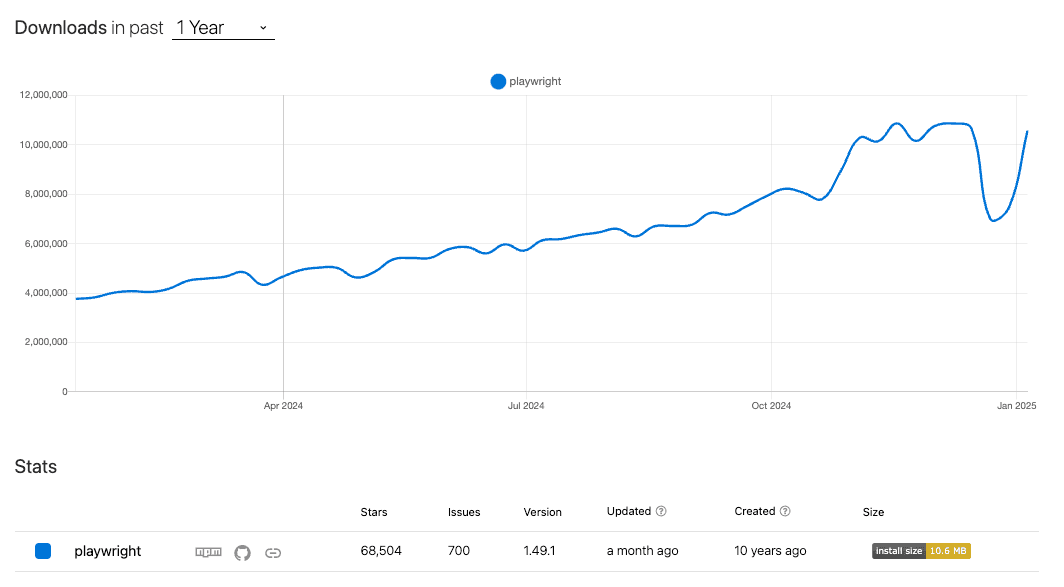
Playwright, a browser automation tool, supports multi-browser rendering and is a strong contender for generating PDFs from HTML.
Installation:
npm install playwrightCode Example:
const { chromium } = require("playwright");

(async () => {
  const browser = await chromium.launch();
  const page = await browser.newPage();
  await page.setContent("<h1>Invoice</h1><p>Customer: John Doe</p>");
  await page.pdf({ path: "invoice.pdf", format: "A4" });
  await browser.close();
})();
Features and Strong Suits: Playwright’s ability to work across Chromium, Firefox, and WebKit makes it highly versatile for generating consistent PDFs across different browsers.
Read the full guide on Playwright for PDF generation.
Generating PDFs With jsPDF
jsPDF uses the canvas API to create lightweight PDFs in Node.js or the browser.
Installation:
npm install jspdfCode Example:
const { jsPDF } = require("jspdf");
const doc = new jsPDF();
doc.text("Invoice", 10, 10);
doc.save("invoice.pdf");
Features and Strong Suits: jsPDF is best for quick and simple PDF generation tasks. While it’s fast, it has limitations with complex layouts and lacks advanced styling support.
Read the full guide on jsPDF for PDF generation.
Generating PDFs With PDFKit
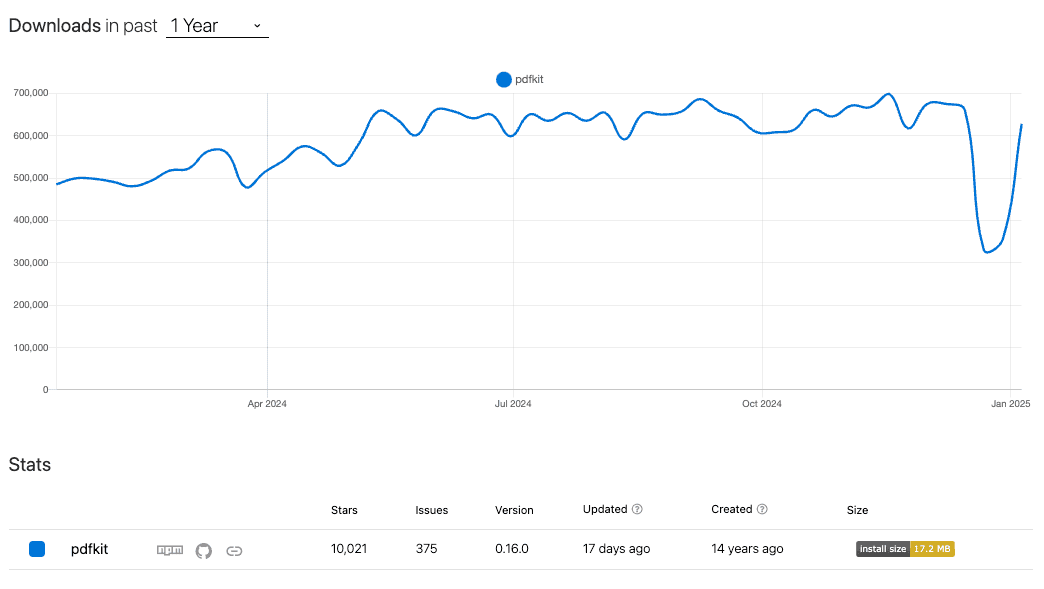
PDFKit allows programmatic PDF generation on the server with full control over content placement.
Installation:
npm install pdfkitCode Example:
const PDFDocument = require("pdfkit");
const fs = require("fs");
const doc = new PDFDocument();

doc.pipe(fs.createWriteStream("invoice.pdf"));
doc.text("Invoice", 100, 50);
doc.text("Customer: John Doe", 100, 70);
doc.end();
Features and Strong Suits: PDFKit offers robust features for creating structured PDFs but requires manual layout configuration. It’s ideal for generating static documents programmatically.
Read the full guide on PDFKit for PDF generation.
Generating PDFs With pdfMake
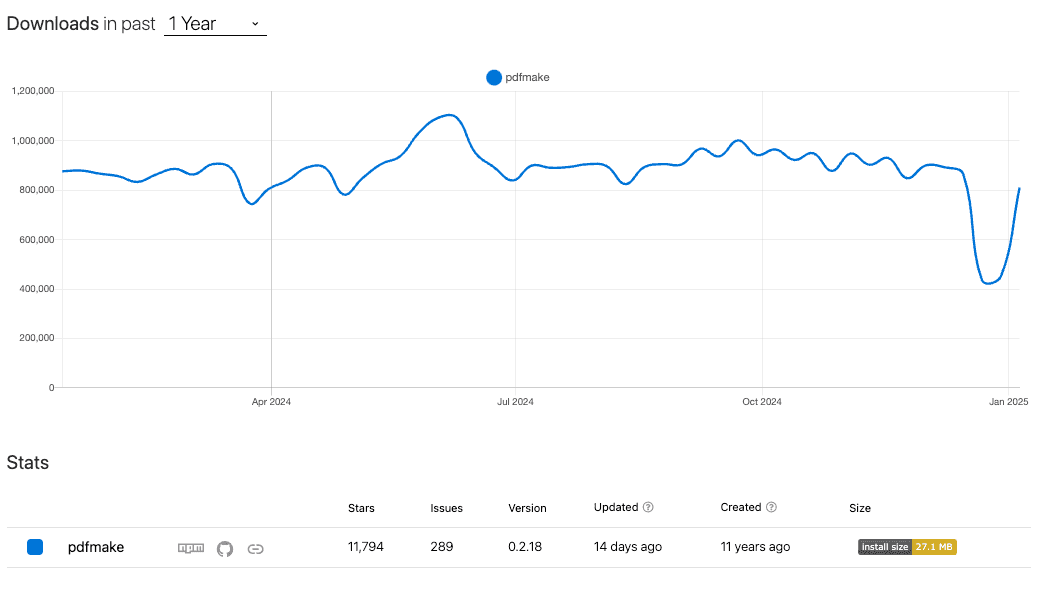
pdfMake uses a declarative JSON structure to simplify the creation of structured PDFs.
Installation:
npm install pdfmakeCode Example:
const pdfMake = require("pdfmake");
const fs = require("fs");

const docDefinition = {
  content: [
    { text: "Invoice", style: "header" },
    "Customer: John Doe",
    {
      table: {
        body: [
          ["Item", "Price"],
          ["Widget A", "$20"],
        ],
      },
    },
  ],
};

const pdfDoc = pdfMake.createPdf(docDefinition);

pdfDoc.getBuffer((buffer) => fs.writeFileSync("invoice.pdf", buffer));
Features and Strong Suits: pdfMake’s declarative approach is ideal for structured documents like invoices or contracts. It simplifies layout handling for developers.
Read the full guide on pdfMake for PDF generation.
Generating PDFs With pdf-lib
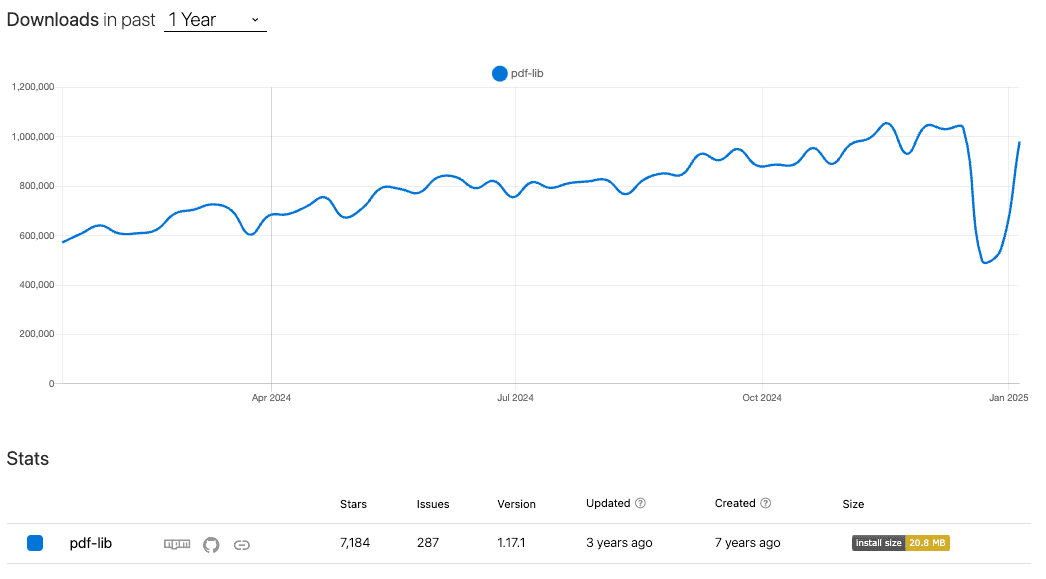
pdf-lib is a versatile library that allows you to merge, split, and edit PDFs directly.
Installation:
npm install pdf-libCode Example:
const { PDFDocument } = require("pdf-lib");
const fs = require("fs");

(async () => {
  const pdfDoc = await PDFDocument.create();
  const page = pdfDoc.addPage([600, 400]);
  page.drawText("Invoice: Customer John Doe");
  const pdfBytes = await pdfDoc.save();
  fs.writeFileSync("invoice.pdf", pdfBytes);
})();
Features and Strong Suits: pdf-lib’s editing capabilities make it ideal for modifying existing PDFs or creating documents with advanced features.
Read the full guide on pdf-lib for PDF generation.
Generating PDFs With React-PDF
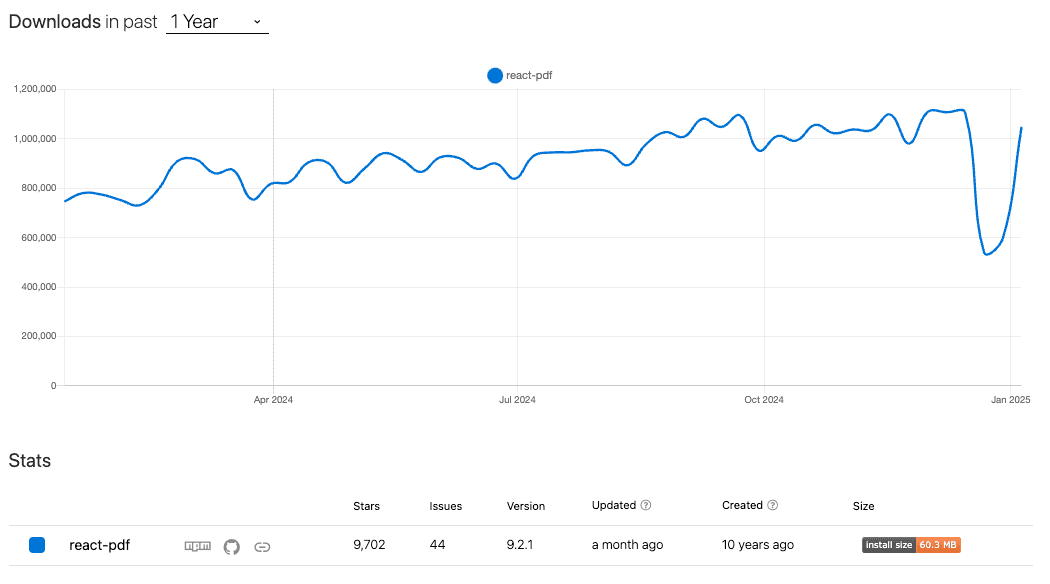
React-PDF integrates seamlessly into React applications, offering dynamic PDF rendering. It also uses pdfkit under the hood.
Installation:
npm install @react-pdf/rendererCode Example:
import { Document, Page, Text, PDFDownloadLink } from '@react-pdf/renderer';
import React from 'react';

const Invoice = ({data}) => (
  <Document>
    <Page>
      <Text>Invoice</Text>
      <Text>Customer: {data.customer}</Text>
    </Page>
  </Document>
);

function App() {
  return (
    <div>
      <h1>Invoice Generator</h1>
      <PDFDownloadLink
        document={<Invoice data={"customer":"John Doe"} />}
        fileName="invoice.pdf"
      >
        {({ loading }) =>
          loading ? 'Generating PDF...' : 'Download Invoice'
        }
      </PDFDownloadLink>
    </div>
  );
}

export default App;
Features and Strong Suits: React-PDF is perfect for React developers needing dynamic, component-driven PDF generation.
Read the full guide on React-PDF for PDF generation.
Generation PDF with pdf noodle

Managing HTML-to-PDF conversion at scale can quickly become a nightmare!
Especially in serverless environments where cold starts, memory limits, and headless browser quirks love to break at the worst possible time (we even wrote a full article about it). Add constant template iterations, version control headaches, and the need to support non-technical contributors, and suddenly your “simple PDF library” turns into an ongoing engineering project.
pdf noodle eliminates all of that.
Instead of maintaining brittle infrastructure or wrestling with outdated pdf libraries, pdf noodle gives you a battle-tested PDF generation API that just works!
Fast, scalable, and designed for both developers and non-developers. You send raw HTML or use our AI-powered template builder, and pdf noodle handles the rendering, scaling, optimization, and delivery so your team doesn’t have to.
Here's an example of a simple API request to generate your pixel-perfect PDF with just a few lines of code:
fetch("https://api.pdfnoodle.com/v1/html-to-pdf/sync", {
  method: "POST",
  body: JSON.stringify({ html: "<html>your-html-here" }),
  headers: { Authorization: "Bearer your-api-key" },
});
pdf noodle also includes a powerful AI Agent that can generate PDF templates instantly, along with a modern editor for refining the design, also using AI, to match your brand. You don't need developing or design experience to quickly update layouts, adjust styling, and manage template versions.
Here’s a quick demo showing how it works:
You can create your account and design your first template without any upfront payment.
If you want to explore other Third Party APIs, we listed all the top 7 PDF Generation APIs in 2025 for PDF Automation. Take a look and choose the best option for you!
Comparison Among Top PDF Libraries Node JS 2025
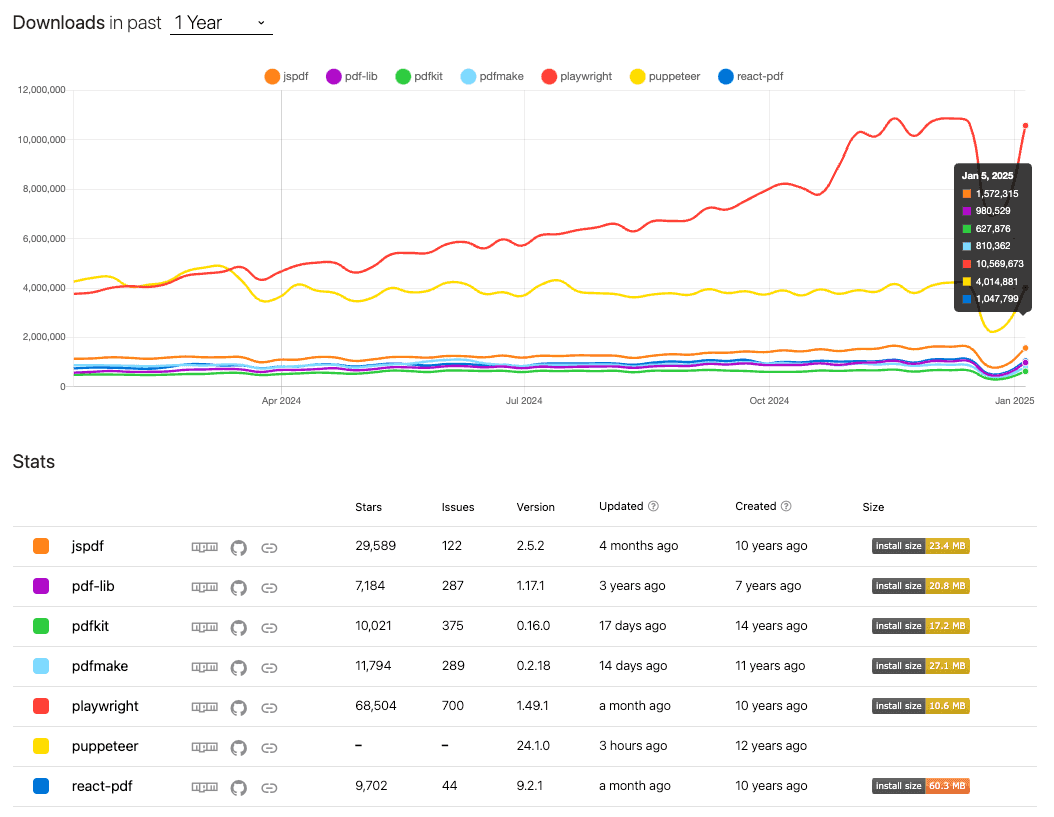
Here’s a summary of the features, performance, and ideal use cases for each library.
| Library    | Ease of Use | Ease of Implementation | Complex Layouts | Resource Heavy | Recommended Usage             |
| ---------- | ----------- | ---------------------- | --------------- | -------------- | ----------------------------- |
| Puppeteer  | Medium      | Moderate               | High            | High           | Dynamic HTML to PDF           |
| Playwright | Medium      | Moderate               | High            | High           | Cross-browser consistency     |
| jsPDF      | Easy        | Easy                   | Low             | Low            | Lightweight PDF creation      |
| PDFKit     | Medium      | Moderate               | Medium          | Medium         | Programmatic PDF creation     |
| pdfMake    | Medium      | Moderate               | High            | Medium         | Declarative document creation |
| pdf-lib    | Easy        | Moderate               | High            | Low            | PDF merging and editing       |
| React-PDF  | Medium      | Moderate               | Medium          | Low            | React-driven dynamic PDFs     |
| pdf noodle | Easy        | Easy                   | High            | Low            | Scalable SaaS workflows       |
Conclusion
Choosing the best PDF library for Node.js depends on your project’s requirements.
Browser-based pdf generation provides high fidelity for visually dynamic pages, whereas non-browser-based solutions focus on performance and ease of setup.
If your primary goal is precise browser rendering, choose browser-based tools such as Playwright or Puppeteer.
Those seeking simpler pipelines or more lightweight libraries might favor PDFKit and jspdf.
If you don't want to waste time maintaining pdfs layouts and their infrastructure or if you don't want to keep track of best practices to generate PDFs at scale, third-party PDF APIs like pdf noodle will save you hours of work and deliver a high quality pdf layout.
Try it yourself: Need a quick conversion without writing code? Use our quick HTML to PDF conversion — no signup required.


