


Overview of PyPDF2 as a Powerful PDF Generation Library
PyPDF2 is a flexible and lightweight Python library designed for manipulating PDF files. It allows developers to merge, split, rotate, and modify existing PDFs, making it a highly valuable tool for SaaS platforms that require dynamic PDF report generation. While PyPDF2 isn’t directly responsible for converting HTML into PDFs, it works in tandem with other tools to help you generate and manipulate your documents efficiently.
You can check the full documentation here.
Alternative PDF Libraries: How PyPDF2 Compares to Other Tools
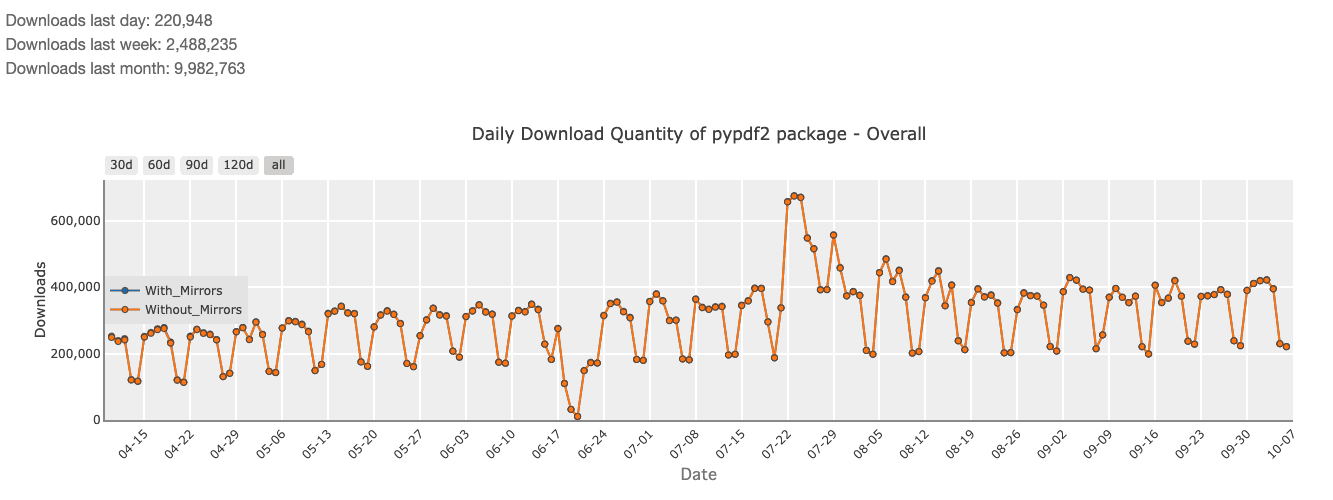
When it comes to HTML to PDF conversion and PDF manipulation, PyPDF2 faces competition from several alternatives. For instance, Pyppeteer (2,063,960 monthly downloads) and Playwright (4,854,528 monthly downloads) are modern libraries that excel at rendering headless browser-based HTML to PDF, making them ideal for capturing pixel-perfect web page screenshots. These tools handle complex JavaScript and CSS seamlessly. However, they come with more overhead compared to PyPDF2.
On the other hand, ReportLab (4,788,417 monthly downloads) is a popular choice for generating PDFs from scratch in Python. Unlike PyPDF2, which manipulates existing PDFs, ReportLab builds them programmatically using drawing commands. This offers precision but lacks the simplicity of HTML-based templates. PyPDF2 stands out by focusing on PDF manipulation while pairing easily with HTML conversion tools.
If you want to dig deeper on a comparison between PyPDF2 and other python pdf libraries, we also have a detailed article with a full comparison between the best PDF libraries for python in 2025.
Setting Up Your Python Environment for PyPDF2
Installing PyPDF2 and Required Dependencies
Before we dive into PDF generation, you need to install both PyPDF2 and pdfkit, which will help us convert HTML to PDF. To begin, install the necessary dependencies:
pip install PyPDF2 pdfkitNext, install pdfkit’s system dependencies, as it requires a rendering engine. You can install wkhtmltopdf, which pdfkit depends on, by following the instructions for your operating system.
sudo apt-get install wkhtmltopdfTesting Your Environment: Quick PyPDF2 Setup
After installing the required packages, you can test the environment by converting an HTML file into a PDF. Create a simple invoice using an HTML file and convert it:
<!DOCTYPE html>
<html>

  <head>

    <style>
            body { font-family: Arial, sans-serif; }
            h1 { color: #333; }
            .invoice { border: 1px solid #ddd; padding: 20px; }

    </style>

  </head>

  <body>

    <div class="invoice">

      <h1>Invoice #001</h1>

      <p>Date: 2024-10-07</p>

      <p>Amount: $500.00</p>

    </div>

  </body>
</html>
Save this as invoice.html, and use the following Python code to convert it to PDF:
import pdfkit
from PyPDF2 import PdfReader, PdfWriter
# Convert HTML to PDF
pdfkit.from_file('invoice.html', 'invoice.pdf')
# Read the generated PDF and manipulate it
with open('invoice.pdf', 'rb') as pdf_file:
    reader = PdfReader(pdf_file)
    writer = PdfWriter()
    for page in reader.pages:
        writer.add_page(page)
    with open('final_invoice.pdf', 'wb') as output_pdf:
        writer.write(output_pdf)
This converts the HTML invoice into a PDF and allows further manipulation using PyPDF2.
How to Convert HTML to PDF Using PyPDF2
Step-by-Step: Converting HTML Files to PDF with PyPDF2
Combining PyPDF2 with pdfkit provides a seamless way to convert HTML files into PDF documents and manipulate them afterward. Once the HTML file is ready, pdfkit handles the conversion, and PyPDF2 gives you the ability to modify, merge, or split the resulting PDF.
import pdfkit
from PyPDF2 import PdfReader
# Convert HTML to PDF
pdfkit.from_file('invoice.html', 'output_invoice.pdf')
# Open the PDF and check its structure
with open('output_invoice.pdf', 'rb') as pdf_file:
    reader = PdfReader(pdf_file)
    print(f"Number of pages: {len(reader.pages)}")
This setup simplifies the conversion of HTML to PDF while keeping the manipulation process efficient.
Handling CSS and JavaScript in HTML to PDF Conversion
The pdfkit tool, which leverages wkhtmltopdf, supports external CSS and JavaScript, allowing you to style your HTML files fully. Whether you’re using inline styles or external stylesheets, pdfkit accurately renders complex designs. However, for JavaScript-heavy pages, ensure the content you need is rendered before triggering the PDF conversion.
Here’s how you would link an external CSS file to style your HTML template:
<link rel="stylesheet" href="styles.css" />For JavaScript, ensure that all dynamic elements are rendered before conversion to avoid missing content in your PDFs.
Using Template Engines with PyPDF2: Streamlining HTML Generation
In dynamic applications, especially SaaS platforms, generating static HTML for every report can be inefficient. Using a template engine like Jinja2 simplifies the process by allowing you to dynamically render HTML templates with real-time data.
Jinja2 enables you to define HTML templates with placeholders and then render them in Python:
from jinja2 import Template
template = Template("""
<!DOCTYPE html>
<html>
<head>
  <style> body { font-family: Arial, sans-serif; } </style>
</head>
<body>
  <h1>Invoice #{{ invoice_id }}</h1>
  <p>Date: {{ date }}</p>
  <p>Amount: {{ amount }}</p>
</body>
</html>
""")
rendered_html = template.render(invoice_id="002", date="2024-10-07", amount="$750.00")
After generating the dynamic HTML, you can pass it to pdfkit to convert it into a PDF.
pdfkit.from_string(rendered_html, 'dynamic_invoice.pdf')This combination of Jinja2 and PyPDF2 allows you to automate the creation of customizable PDF reports based on user data or events, perfect for SaaS applications.
How to Merge, Split, and Manipulate PDFs with PyPDF2 API
PyPDF2 isn’t just about generating PDFs from HTML—it also offers powerful tools to manipulate existing PDFs. You can easily split a PDF into smaller files or merge several PDFs into one. These features are crucial for generating complex reports or managing document workflows.
Here’s how to merge two PDF files into a single document:
from PyPDF2 import PdfMerger
merger = PdfMerger()
merger.append("file1.pdf")
merger.append("file2.pdf")
merger.write("merged_output.pdf")
merger.close()
For splitting, you can extract a specific range of pages:
from PyPDF2 import PdfReader, PdfWriter
reader = PdfReader("large_file.pdf")
writer = PdfWriter()
for page in range(5):  # Extracts the first 5 pages
    writer.add_page(reader.pages[page])
with open("extracted_pages.pdf", "wb") as output_file:
    writer.write(output_file)
This versatility makes PyPDF2 ideal for a wide range of document management tasks, particularly in multi-step workflows.
Alternative: Convert HTML to PDF Using pdf noodle

Managing HTML-to-PDF conversion at scale can quickly become a nightmare!
Especially in serverless environments where cold starts, memory limits, and headless browser quirks love to break at the worst possible time (we even wrote a full article about it). Add constant template iterations, version control headaches, and the need to support non-technical contributors, and suddenly your “simple PDF library” turns into an ongoing engineering project.
pdf noodle eliminates all of that.
Instead of maintaining brittle infrastructure or wrestling with outdated pdf libraries, pdf noodle gives you a battle-tested PDF generation API that just works!
Fast, scalable, and designed for both developers and non-developers. You send raw HTML or use our AI-powered template builder, and pdf noodle handles the rendering, scaling, optimization, and delivery so your team doesn’t have to.
Here's an example of a simple API request to generate your pixel-perfect PDF with just a few lines of code:
import requests

url = 'https://api.pdfnoodle.com/v1/html-to-pdf/sync'
payload = {
    "html": "<html>...your-html-here",
}
headers = {"Authorization": "Bearer YOUR_API_KEY"}

response = requests.post(url, json=payload, headers=headers)

with open('invoice.pdf', 'wb') as f:
    f.write(response.content)
pdf noodle also includes a powerful AI Agent that can generate PDF templates instantly, along with a modern editor for refining the design, also using AI, to match your brand. You don't need developing or design experience to quickly update layouts, adjust styling, and manage template versions.
Here’s a quick demo showing how it works:
You can create your account and design your first template without any upfront payment.
Conclusion
PyPDF2 is a highly flexible and powerful tool for manipulating PDFs in Python, especially when combined with a robust HTML-to-PDF converter like pdfkit. For smaller, on-demand PDF generation tasks, PyPDF2 is an excellent choice. However, when scalability becomes a concern, or if you require pixel-perfect HTML rendering with JavaScript and CSS, alternatives like Pyppeteer.
If you don't want to waste time maintaining pdfs layouts and their infrastructure or if you don't want to keep track of best practices to generate PDFs at scale, third-party PDF APIs like pdf noodle will save you hours of work and deliver a high quality pdf layout.
Try it yourself: Need a quick conversion without writing code? Use our HTML to PDF online tool — no signup required.


