


Introduction: Why Use PDFMake for HTML to PDF Conversion in SaaS
For SaaS applications, generating PDF reports is essential for delivering structured, portable, and printable documents to users. PDFMake, a versatile pdf library, allows developers to build custom PDF documents directly from JavaScript objects. Its flexibility makes it an attractive choice for creating tailored reports, invoices, or any document that requires a standardized format, giving developers precise control over content and layout without relying on browser-based rendering.
You can check the full documentation here.
Alternative PDF Libraries: How PDFMake Compares to Other Tools
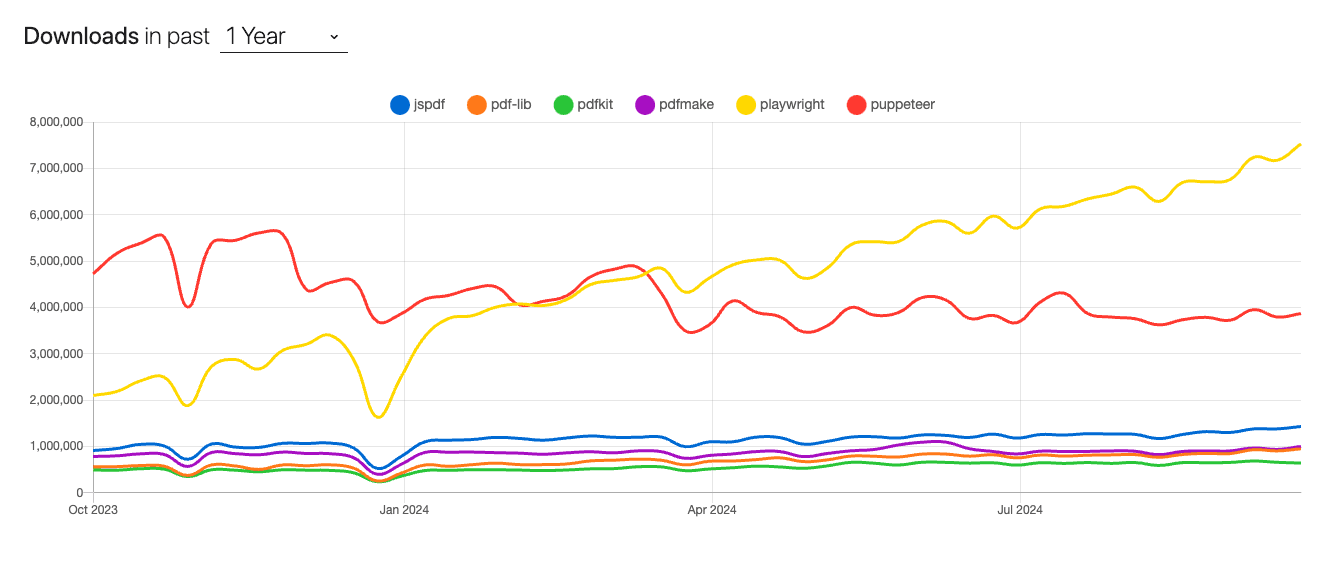
When comparing PDF generation tools, PDFMake falls into the category of low-level libraries like jsPDF, where developers define PDF structure programmatically using a JSON-like document object. On the other hand, high-level tools such as Playwright and Puppeteer operate by capturing a rendered HTML page through a headless browser.
While high-level libraries are often easier for rendering complete web pages into PDFs, PDFMake excels in scenarios where fine-grained control over the document structure and layout is required.
If you want to dig deeper on a comparison between playwright and other javascript pdf libraries, we also have a detailed article with a full comparison between the best PDF libraries for NodeJs in 2025.
Setting Up Your Environment for PDFMake and Node.js
Installing PDFMake and Node.js for Seamless Integration
To start building PDFs, ensure that you have Node.js installed. Then, integrate PDFMake into your project by installing it with npm:
npm install pdfmake --saveThis command adds PDFMake to your project, allowing you to programmatically generate PDFs from within a Node.js environment. With this setup, you can begin assembling PDFs using JavaScript objects.
Setting Up Your Project Structure for HTML to PDF Conversion
To demonstrate how PDFMake can replicate an HTML document, let’s use an example of an invoice written in plain HTML and CSS:
<div class="invoice">
  <h1>Invoice #1234</h1>
  <p>Date: 2024-10-01</p>
  <p>Customer: John Doe</p>
  <table>
    <tr>
      <th>Item</th>
      <th>Quantity</th>
      <th>Price</th>
    </tr>
    <tr>
      <td>Widget A</td>
      <td>2</td>
      <td>$10</td>
    </tr>
    <tr>
      <td>Widget B</td>
      <td>5</td>
      <td>$20</td>
    </tr>
  </table>
</div>
This simple invoice file will serve as our reference for building a similar layout using PDFMake. Since PDFMake doesn't render HTML directly, we must replicate the structure programmatically.
Converting HTML to PDF with PDFMake: Step-by-Step Guide
Styling Your PDFs: How to Replicate HTML and CSS Styles Using PDFMake
Since PDFMake doesn’t convert raw HTML into PDFs, you need to define the content structure programmatically. Let’s start by replicating the invoice’s heading and text:
const docDefinition = {
  content: [
    { text: "Invoice #1234", style: "header" },
    { text: "Date: 2024-10-01", margin: [0, 20, 0, 20] },
    { text: "Customer: John Doe", margin: [0, 20, 0, 20] },
  ],
  styles: {
    header: { fontSize: 22, bold: true },
  },
};
This structure defines the header and customer details, mimicking the HTML’s layout. You can add custom fonts and styles as needed.
Using PDFMake’s Table and Layout Features for Structured Reports
Next, we’ll convert the invoice table to PDFMake’s table format. PDFMake provides a simple API for creating tables and specifying cell alignment, similar to HTML tables:
const docDefinition = {
  content: [
    { text: "Invoice #1234", style: "header" },
    { text: "Date: 2024-10-01", margin: [0, 20, 0, 20] },
    { text: "Customer: John Doe", margin: [0, 20, 0, 20] },
    {
      table: {
        body: [
          ["Item", "Quantity", "Price"],
          ["Widget A", "2", "$10"],
          ["Widget B", "5", "$20"],
        ],
      },
    },
  ],
  styles: {
    header: { fontSize: 22, bold: true },
  },
};
Here, the body attribute defines the rows and cells of the table, effectively replicating the HTML table structure.
Adding Images, Headers, and Footers Using PDFMake’s Features
To complete the invoice, you can add a company logo or other images using base64 or a URL reference, and customize headers and footers for page numbers or branding:
const docDefinition = {
  header: "Company Logo Here",
  footer: (currentPage, pageCount) => `Page ${currentPage} of ${pageCount}`,
  content: [
    { text: "Invoice #1234", style: "header" },
    { text: "Date: 2024-10-01", margin: [0, 20, 0, 20] },
    { text: "Customer: John Doe", margin: [0, 20, 0, 20] },
    {
      table: {
        body: [
          ["Item", "Quantity", "Price"],
          ["Widget A", "2", "$10"],
          ["Widget B", "5", "$20"],
        ],
      },
    },
  ],
  styles: {
    header: { fontSize: 22, bold: true },
  },
};
Creating Interactive PDFs: Adding Links and Form Fields
For interactivity, PDFMake supports hyperlinks and form fields, allowing you to create more engaging documents. You can add links to your invoices for online payment options:
const docDefinition = {
  content: [
    { text: "Invoice #1234", style: "header" },
    { text: "Date: 2024-10-01", margin: [0, 20, 0, 20] },
    { text: "Customer: John Doe", margin: [0, 20, 0, 20] },
    {
      table: {
        body: [
          ["Item", "Quantity", "Price"],
          ["Widget A", "2", "$10"],
          ["Widget B", "5", "$20"],
        ],
      },
    },
    {
      text: "Pay Now",
      link: "https://payment-link.com",
      color: "blue",
      margin: [0, 20, 0, 20],
    },
  ],
};
Debugging and Troubleshooting Common Issues in HTML to PDF Conversions
PDFMake doesn’t parse or render HTML. This is both a benefit and a limitation—on the one hand, you have full control over how your document is structured, but on the other, you must manually map HTML content to PDFMake’s syntax. Common issues include incorrect layout rendering or broken table structures. Always ensure that your data structure matches the expected input of PDFMake’s API.
How to Use a PDF API to Automate PDF Creation at Scale
For SaaS platforms generating PDFs at scale, you may need to offload the process to a PDF API. Third-party solutions like pdf noodle offer robust APIs for automating bulk PDF generation. By sending the structured data to an API, you can automate PDF creation without the need to manage resources directly.
fetch("https://api.pdfnoodle.com/v1/pdf/sync", {
  method: "POST",
  body: JSON.stringify({
    templateId: "your-template",
    data: { html: "your-html" },
  }),
  headers: { Authorization: "Bearer your-api-key" },
});
Alternative: Convert HTML to PDF Using pdf noodle

Managing HTML-to-PDF conversion at scale can quickly become a nightmare!
Especially in serverless environments where cold starts, memory limits, and headless browser quirks love to break at the worst possible time (we even wrote a full article about it). Add constant template iterations, version control headaches, and the need to support non-technical contributors, and suddenly your “simple PDF library” turns into an ongoing engineering project.
pdf noodle eliminates all of that.
Instead of maintaining brittle infrastructure or wrestling with outdated pdf libraries, pdf noodle gives you a battle-tested PDF generation API that just works!
Fast, scalable, and designed for both developers and non-developers. You send raw HTML or use our AI-powered template builder, and pdf noodle handles the rendering, scaling, optimization, and delivery so your team doesn’t have to.
Here's an example of a simple API request to generate your pixel-perfect PDF with just a few lines of code:
fetch('https://api.pdfnoodle.com/v1/html-to-pdf/sync', {
  method: 'POST',
  body: JSON.stringify({ html:'your-html' } }),
  headers: { 'Authorization' : 'Bearer your-api-key' }
});
pdf noodle also includes a powerful AI Agent that can generate PDF templates instantly, along with a modern editor for refining the design, also using AI, to match your brand. You don't need developing or design experience to quickly update layouts, adjust styling, and manage template versions.
Here’s a quick demo showing how it works:
You can create your account and design your first template without any upfront payment.
Conclusion
While PDFMake offers an excellent solution for generating highly customizable PDFs with fine-grained control, it’s best suited for cases where you need to build documents from structured data. For more complex layouts or when replicating entire web pages, higher-level tools like Playwright or Puppeteer are preferable due to their ability to render PDFs based on browser rendering.
If you don't want to waste time maintaining pdfs layouts and their infrastructure or if you don't want to keep track of best practices to generate PDFs at scale, third-party PDF APIs like pdf noodle will save you hours of work and deliver a high quality pdf layout.
Try it yourself: Need a quick conversion without writing code? Use our HTML to PDF converter online — no signup required.


