


What is jsPDF? (And How to Generate PDFs in JavaScript)
jsPDF is a lightweight JavaScript library that lets you generate PDF documents directly in the browser. No server required.
It's one of the most popular client-side PDF libraries on npm, ideal for creating invoices, reports, certificates, and other downloadable documents from your web app.
In this guide, you'll learn how to:
- Generate your first PDF with jsPDF (quick start)
- Convert HTML to PDF using html2canvas
- Add images, tables, and custom fonts
- Handle multi-page documents
We'll also compare jsPDF to server-side alternatives like Puppeteer and Playwright, so you can pick the right tool for your use case.
→ View the official jsPDF documentation
Alternative PDF Libraries: How jsPDF Compares to Other Tools
jsPDF is the most popular PDF library on npm for generating PDFs purely in JavaScript.
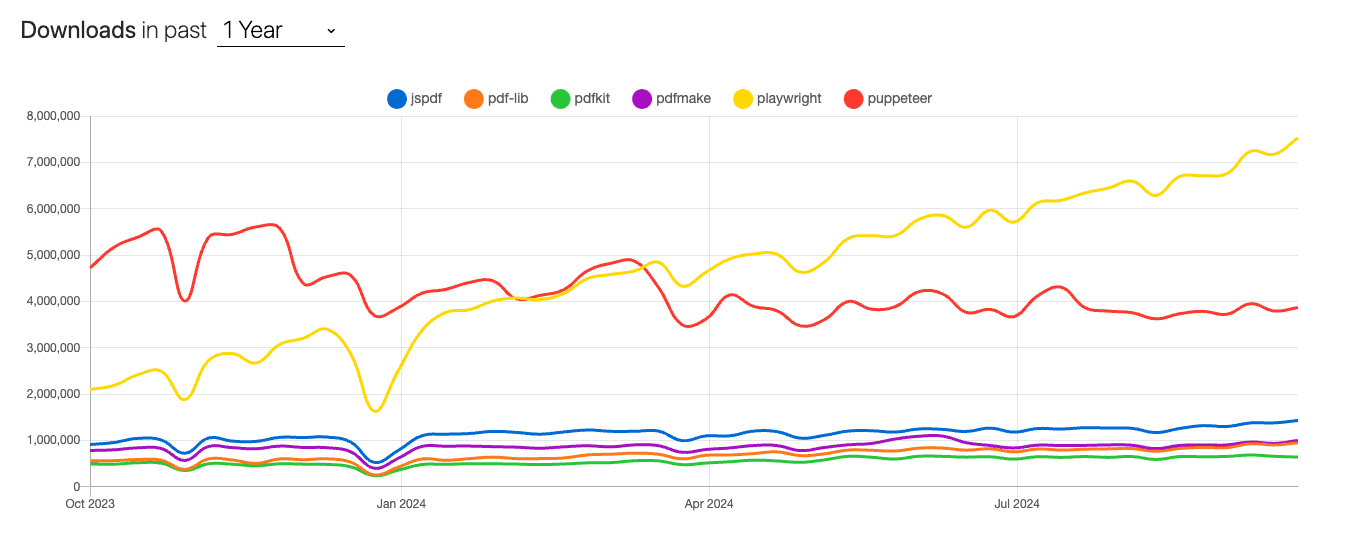
Libraries like Playwright or Puppeteer are widely used for rendering HTML into PDFs via headless browser instances. These tools offer greater accuracy in rendering CSS and are excellent for visually rich documents but come at the cost of increased resource usage.
Its client-side capabilities make it a great option for lightweight use cases where server resources are limited. But it's important to note that jsPDF is a low-level solution, like pdfmake or PDFKit.
If you want to go deep on a full comparison between pdf libraries in javascript for 2025, you can check out this guide.
Step 1: Setting Up jsPDF
You can add jsPDF to your project via npm or CDN.
Option A: npm (recommended for production)
npm install jspdf jspdf-autotableThen import it in your JavaScript:
import { jsPDF } from "jspdf";
import "jspdf-autotable";
Option B: CDN (quick prototyping)
Add these scripts to your HTML file:
<!DOCTYPE html>
<html lang="en">
  <head>
    <meta charset="UTF-8" />
    <meta name="viewport" content="width=device-width, initial-scale=1.0" />
    <title>jsPDF Tutorial</title>
  </head>
  <body>
    <button id="generatePdf">Generate PDF</button>

    <!-- jsPDF + AutoTable plugin -->
    <script src="https://cdnjs.cloudflare.com/ajax/libs/jspdf/2.5.1/jspdf.umd.min.js"></script>
    <script src="https://cdnjs.cloudflare.com/ajax/libs/jspdf-autotable/3.8.2/jspdf.plugin.autotable.min.js"></script>
    <script src="app.js"></script>
  </body>
</html>
We'll use the CDN approach for this tutorial, but the JavaScript code works the same with npm.
Step 2: Your First PDF with jsPDF (Hello World)
Let's build a PDF that demonstrates the core jsPDF features: text styling, images, tables, shapes, and multi-page documents.
Create an app.js file:
document.getElementById("generatePdf").addEventListener("click", () => {
  const { jsPDF } = window.jspdf;

  // Initialize PDF (A4, portrait, millimeters)
  const doc = new jsPDF({
    orientation: "portrait",
    unit: "mm",
    format: "a4",
  });

  // ===== TEXT & STYLING =====
  doc.setFont("helvetica", "bold");
  doc.setFontSize(22);
  doc.setTextColor(242, 92, 63); // RGB values
  doc.text("Hello World PDF", 20, 30);

  doc.setFont("helvetica", "normal");
  doc.setFontSize(12);
  doc.setTextColor(0, 0, 0);
  doc.text("This PDF was generated with jsPDF in the browser.", 20, 45);

  // ===== DRAWING A CARD (Rectangle + Text) =====
  doc.setDrawColor(200, 200, 200);
  doc.setFillColor(248, 249, 250);
  doc.roundedRect(20, 55, 170, 30, 3, 3, "FD"); // x, y, width, height, rx, ry, style

  doc.setFontSize(10);
  doc.setTextColor(100, 100, 100);
  doc.text("This is a card component — a rectangle with text inside.", 30, 72);

  // ===== ADDING AN IMAGE =====
  // Use a base64 string or URL (must be same-origin or CORS-enabled)
  const logoBase64 = "data:image/png;base64,..."; // Your base64 image
  doc.addImage(logoBase64, "PNG", 20, 95, 40, 15);

  // ===== TABLE WITH AUTOTABLE =====
  doc.autoTable({
    startY: 100,
    head: [["Name", "Email", "Role"]],
    body: [
      ["Alice", "alice@example.com", "Developer"],
      ["Bob", "bob@example.com", "Designer"],
      ["Charlie", "charlie@example.com", "Manager"],
    ],
    headStyles: { fillColor: [242, 92, 63] },
    margin: { left: 20, right: 20 },
  });

  // ===== ADDING A NEW PAGE =====
  doc.addPage();

  doc.setFontSize(16);
  doc.setTextColor(0, 0, 0);
  doc.text("Page 2: Additional Content", 20, 30);

  doc.setFontSize(12);
  doc.text("Use doc.addPage() to create multi-page documents.", 20, 45);

  // ===== DRAWING LINES =====
  doc.setDrawColor(242, 92, 63);
  doc.setLineWidth(0.5);
  doc.line(20, 55, 190, 55); // x1, y1, x2, y2

  // Save the PDF
  doc.save("hello-world.pdf");
});
jsPDF Method Reference
Here's what each method does:
| Method | Parameters | Description |
|---|---|---|
new jsPDF(options) | { orientation, unit, format } | Creates PDF. Units: "mm", "pt", "in". Formats: "a4", "letter", etc. |
setFont(name, style) | "helvetica", "bold" | Sets font. Built-in: helvetica, times, courier. Styles: normal, bold, italic. |
setFontSize(size) | 12 | Sets font size in the document's unit. |
setTextColor(r, g, b) | 0-255 for each | Sets text color using RGB values. |
text(content, x, y) | String, coordinates | Adds text at position. Y increases downward. |
roundedRect(x, y, w, h, rx, ry, style) | Coordinates, radius, "F"/"D"/"FD" | Draws rectangle. F=fill, D=draw stroke, FD=both. |
setFillColor(r, g, b) | 0-255 for each | Sets fill color for shapes. |
setDrawColor(r, g, b) | 0-255 for each | Sets stroke color for shapes and lines. |
line(x1, y1, x2, y2) | Start and end coordinates | Draws a line between two points. |
addImage(data, format, x, y, w, h) | Base64 or URL, "PNG"/"JPEG" | Embeds an image. |
addPage() | — | Adds a new page and moves focus to it. |
save(filename) | "document.pdf" | Downloads the PDF. |
autoTable(options) | See AutoTable docs | Generates tables from data. Requires the AutoTable plugin. |
📹 Video Tutorial: Watch the full walkthrough with live coding examples.
Step 3: Production-Ready Example – Generating an Invoice
The Hello World example covers the basics, but real-world PDFs require more structure. Here's how to build a maintainable invoice generator with best practices.
Best Practices for Complex PDFs
- Use a config object — Centralize all measurements, colors, and fonts
- Track Y position — Update
yPositionafter each element to maintain vertical flow - Use AutoTable for data — Don't manually position table cells
- Plan for page breaks — Check remaining space before adding content
- Create reusable functions — Headers, footers, and sections should be modular
Invoice Generator Code
function generateInvoice() {
  const { jsPDF } = window.jspdf;

  // Centralized configuration
  const CONFIG = {
    page: {
      width: 210,
      height: 297,
      format: "a4",
      unit: "mm",
      orientation: "portrait",
    },
    margins: { top: 20, left: 20, right: 20, bottom: 20 },
    colors: {
      primary: [242, 92, 63],
      text: [0, 0, 0],
      muted: [150, 150, 150],
      border: [222, 226, 230],
      bgLight: [248, 249, 250],
    },
    fonts: { default: 12, small: 8, medium: 10, large: 16, title: 20 },
  };

  // Initialize document
  const doc = new jsPDF({
    orientation: CONFIG.page.orientation,
    unit: CONFIG.page.unit,
    format: CONFIG.page.format,
  });

  // Track Y position for vertical layout
  let yPosition = CONFIG.margins.top;

  // ===== TITLE =====
  doc.setFontSize(CONFIG.fonts.title);
  yPosition += 2;
  doc.text("INVOICE", CONFIG.margins.left, yPosition);
  yPosition += 13;

  // ===== FROM / TO SECTIONS =====
  doc.setFontSize(CONFIG.fonts.medium);
  doc.setTextColor(...CONFIG.colors.text);

  const fromStartY = yPosition;
  doc.text("From: Acme Corp", CONFIG.margins.left, yPosition);
  yPosition += 5;
  doc.text("123 Business St", CONFIG.margins.left, yPosition);
  yPosition += 5;
  doc.text("San Francisco, CA 94105", CONFIG.margins.left, yPosition);

  // Right column (Bill To)
  const rightColumnX = CONFIG.page.width / 2 + 10;
  yPosition = fromStartY;
  doc.text("To: Client Name", rightColumnX, yPosition);
  yPosition += 5;
  doc.text("456 Client Ave", rightColumnX, yPosition);
  yPosition += 5;
  doc.text("New York, NY 10001", rightColumnX, yPosition);
  yPosition += 10;

  // ===== INVOICE DETAILS =====
  doc.text("Invoice #: INV-2025-001", CONFIG.margins.left, yPosition);
  doc.text("Date: January 26, 2025", rightColumnX, yPosition);
  yPosition += 10;

  // ===== ITEMS TABLE =====
  doc.autoTable({
    startY: yPosition,
    head: [["Item", "Qty", "Price", "Total"]],
    body: [
      ["API Monthly", "1", "$49", "$49"],
      ["Extra Calls", "2", "$10", "$20"],
      ["Support Package", "1", "$99", "$99"],
    ],
    theme: "striped",
    margin: { left: CONFIG.margins.left, right: CONFIG.margins.right },
    headStyles: {
      fillColor: CONFIG.colors.primary,
      textColor: 255,
      fontStyle: "bold",
    },
    styles: {
      fontSize: CONFIG.fonts.medium,
      cellPadding: 5,
    },
    columnStyles: {
      0: { cellWidth: 80 },
      1: { cellWidth: 30, halign: "center" },
      2: { cellWidth: 30, halign: "right" },
      3: { cellWidth: 30, halign: "right" },
    },
  });

  // ===== TOTAL =====
  const finalY = doc.lastAutoTable.finalY + 10;
  const rightMargin = CONFIG.page.width - CONFIG.margins.right;

  doc.setFontSize(CONFIG.fonts.default);
  doc.setFont(undefined, "bold");
  doc.setTextColor(...CONFIG.colors.text);
  doc.text("Total: $168.00", rightMargin, finalY, { align: "right" });

  // Save
  doc.save("invoice.pdf");
}
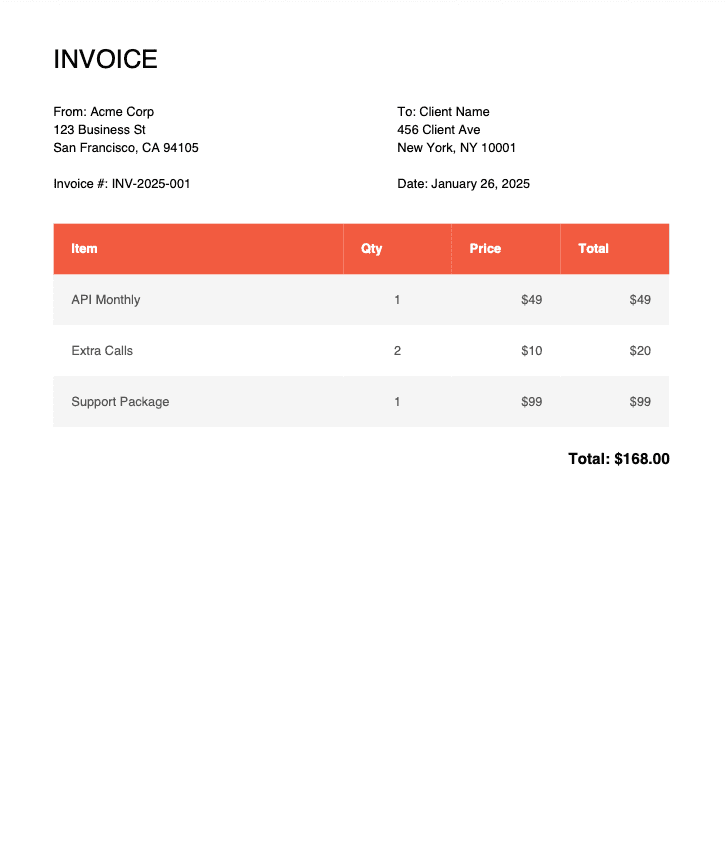
Here's how the final invoice should look like for this example:
💡 Full source code: Clone the complete tutorial repository with all examples: github.com/pdfnoodle/youtube-jspdf-tutorial
Key Patterns Explained
Config object: All magic numbers live in one place. Need to change the primary color? Update CONFIG.colors.primary once.
Y position tracking: After each element, increment yPosition by the element's height plus desired spacing. This prevents overlapping content.
AutoTable's **finalY**: After rendering a table, doc.lastAutoTable.finalY gives you the Y coordinate where the table ended — essential for positioning content below it.
Handling page breaks: For dynamic content (variable-length tables), check if there's enough space before adding new sections:
const remainingSpace = CONFIG.page.height - yPosition - CONFIG.margins.bottom;
if (remainingSpace < 50) {
  doc.addPage();
  yPosition = CONFIG.margins.top;
}
Step 4: Convert HTML to PDF Using jsPDF + html2canvas
Sometimes you need pixel-perfect PDFs that match a complex HTML layout: gradients, flexbox, custom fonts, hover states frozen in time. That's where html2canvas comes in.
How It Works
html2canvascaptures an HTML element and renders it to a<canvas>- The canvas is converted to a PNG image
- jsPDF embeds that image into the PDF
When to Use This Approach
| ✅ Best for | ⚠️ Trade-offs |
|---|---|
| Complex CSS layouts (flexbox, grid) | Larger file sizes (image-based) |
| Exact visual fidelity | Text is rasterized (not selectable/searchable) |
| Quick prototypes without redesigning for jsPDF | Requires both libraries loaded |
| Preserving web fonts and gradients | Higher memory usage for large documents |
Code Example
HTML setup (include both libraries):
<script src="https://cdnjs.cloudflare.com/ajax/libs/html2canvas/1.4.1/html2canvas.min.js"></script>
<script src="https://cdnjs.cloudflare.com/ajax/libs/jspdf/2.5.1/jspdf.umd.min.js"></script>
JavaScript (app.js):
async function convertHtmlToPdf() {
  const invoiceElement = document.querySelector("#invoice");

  if (!invoiceElement) {
    console.error("Invoice element not found");
    return;
  }

  try {
    // Capture HTML as canvas
    const canvas = await html2canvas(invoiceElement, {
      scale: 2, // 2x resolution for sharper output
      useCORS: true, // Enable cross-origin images
      logging: false,
      backgroundColor: "#ffffff",
    });

    // Calculate dimensions (maintain aspect ratio)
    const imgWidth = canvas.width;
    const imgHeight = canvas.height;
    const pdfWidth = 210; // A4 width in mm
    const pdfHeight = (imgHeight * pdfWidth) / imgWidth;

    // Create PDF
    const { jsPDF } = window.jspdf;
    const pdf = new jsPDF("portrait", "mm", "a4");

    const pageHeight = pdf.internal.pageSize.height;
    let heightLeft = pdfHeight;
    let position = 0;

    // Convert canvas to image
    const imgData = canvas.toDataURL("image/png");

    // Add first page
    pdf.addImage(imgData, "PNG", 0, position, pdfWidth, pdfHeight);
    heightLeft -= pageHeight;

    // Handle multi-page content
    while (heightLeft > 0) {
      position = heightLeft - pdfHeight;
      pdf.addPage();
      pdf.addImage(imgData, "PNG", 0, position, pdfWidth, pdfHeight);
      heightLeft -= pageHeight;
    }

    pdf.save("invoice-from-html.pdf");
    console.log("PDF generated successfully!");
  } catch (error) {
    console.error("Error generating PDF:", error);
  }
}
📄 Full HTML template: See the complete invoice HTML with styling in the GitHub repository.
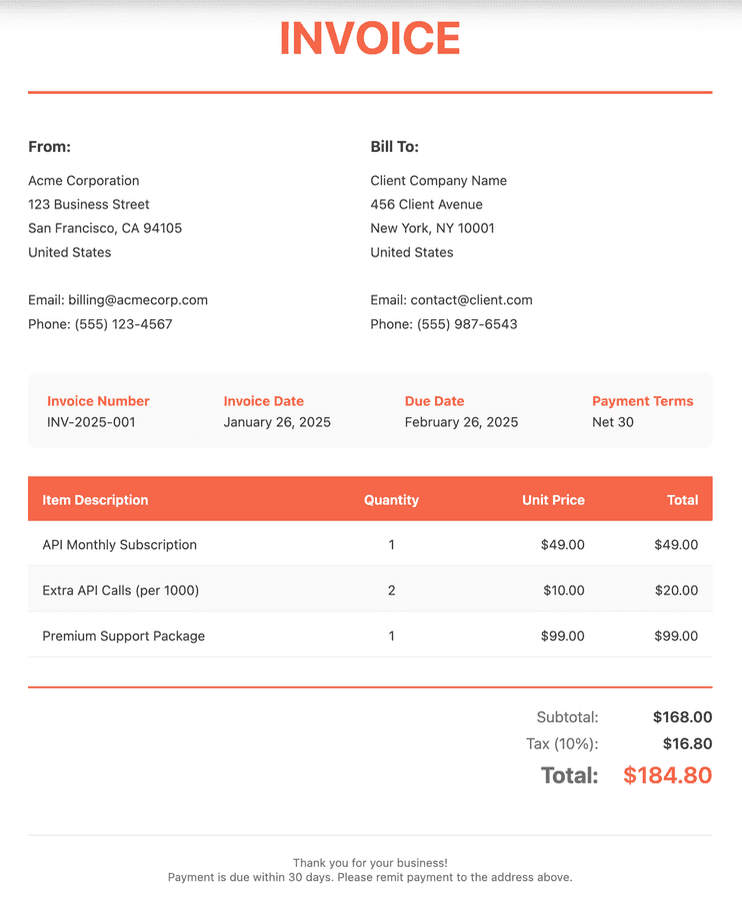
Here's how the invoice from the code sample below looks like:
html2canvas Options Explained
| Option | Value | Purpose |
|---|---|---|
scale | 2 | Renders at 2x resolution for sharper PDFs. Increase for print quality. |
useCORS | true | Allows capturing cross-origin images (requires server CORS headers). |
backgroundColor | "#ffffff" | Sets background color. Use null for transparent. |
logging | false | Disables console output for cleaner logs. |
Pro Tip: Use Template Engines for Dynamic HTML-to-PDF
When generating PDFs from HTML, hardcoding content gets messy fast. Template engines like Handlebars let you separate your layout from your data.
Basic Handlebars Example
// Define your template
const template = `
  <div class="invoice">
    <h1>Invoice #{{invoiceNumber}}</h1>
    <p>Date: {{date}}</p>

    <table>
      {{#each items}}
      <tr>
        <td>{{name}}</td>
        <td>{{quantity}}</td>
        <td>{{price}}</td>
      </tr>
      {{/each}}
    </table>

    <p class="total">Total: {{total}}</p>
  </div>
`;

// Your data
const data = {
  invoiceNumber: "INV-2025-001",
  date: "January 26, 2025",
  items: [
    { name: "API Monthly", quantity: 1, price: "$49" },
    { name: "Extra Calls", quantity: 2, price: "$20" },
  ],
  total: "$69",
};

// Compile and render
const compiledTemplate = Handlebars.compile(template);
const html = compiledTemplate(data);

// Now pass `html` to html2canvas or inject into the DOM
document.getElementById("pdf-content").innerHTML = html;
When Template Engines Make Sense
- Data-driven PDFs — Invoices, reports, certificates with variable content
- Reusable templates — Same layout, different data for each customer
- Non-developer editing — Marketing can update template copy without touching JS
- Server-side pre-rendering — Generate HTML on the backend, convert to PDF on the client
🚀 Scaling beyond client-side? If you're generating hundreds of PDFs or need server-side rendering, check out [pdf noodle's API(/pdf-generation-api). It handles HTML-to-PDF conversion at scale without managing headless browsers.
Alternative: Generating PDFs using pdf noodle

Managing HTML-to-PDF conversion at scale can quickly become a nightmare!
Especially in serverless environments where cold starts, memory limits, and headless browser quirks love to break at the worst possible time (we even wrote a full article about it). Add constant template iterations, version control headaches, and the need to support non-technical contributors, and suddenly your “simple PDF library” turns into an ongoing engineering project.
pdf noodle eliminates all of that.
Instead of maintaining brittle infrastructure or wrestling with outdated pdf libraries, pdf noodle gives you a battle-tested PDF generation API that just works!
Fast, scalable, and designed for both developers and non-developers. You send raw HTML or use our AI-powered template builder, and pdf noodle handles the rendering, scaling, optimization, and delivery so your team doesn’t have to.
Here's an example of a simple API request to generate your pixel-perfect PDF with just a few lines of code:
fetch('https://api.pdfnoodle.com/v1/html-to-pdf/sync', {
  method: 'POST',
  body: JSON.stringify({ html:'your-html' } }),
  headers: { 'Authorization' : 'Bearer your-api-key' }
});
pdf noodle also includes a powerful AI Agent that can generate PDF templates instantly, along with a modern editor for refining the design, also using AI, to match your brand. You don't need developing or design experience to quickly update layouts, adjust styling, and manage template versions.
Here’s a quick demo showing how it works:
You can create your account and design your first template without any upfront payment.
Conclusion
jsPDF is a reliable way to generate PDFs directly in the browser, no server required. Pair it with AutoTable for data tables or html2canvas for pixel-perfect HTML conversion, and you can handle most client-side PDF needs.
For high-volume or server-side generation, consider Puppeteer or Playwright.
Or skip the infrastructure entirely. pdf noodle gives you an HTML-to-PDF API that scales automatically, so you can focus on your product instead of managing headless browsers.
Try it yourself: Need a quick conversion without writing code? Use our free HTML to PDF converter — no signup required.


