


When creating dynamic PDF reports for SaaS applications, developers often prefer converting existing HTML to PDF for greater control over layout and design. In this article, we'll specifically focus on libraries capable of converting HTML to PDF using NodeJs, excluding libraries like jsPDF or PDFKit, which don't support direct HTML conversion. We'll compare the top contenders to help you select the ideal solution for your use case.
HTML to PDF conversion offers several advantages, including high fidelity rendering, precise CSS and JavaScript support, and pixel-perfect layout consistency. However, it also comes with trade-offs such as higher resource consumption, potentially slower performance due to browser rendering, and the need for server-side infrastructure to manage the conversion process effectively.
Overview of top HTML to PDF Conversion Libraries for NodeJS
The advent of browserless services revolutionized HTML to PDF conversions a few years ago, allowing developers to create pixel-perfect PDFs directly from HTML content—provided printing best practices are followed (see our article on printer friendly best practices). Unlike standard PDF generation libraries (explore top PDF Generation Libraries for Node), HTML to PDF libraries use browser engines, enabling precise rendering of complex CSS layouts and JavaScript-driven interfaces into PDFs.
We'll discuss three primary libraries:
- Playwright
- Puppeteer
- html-pdf
Playwright
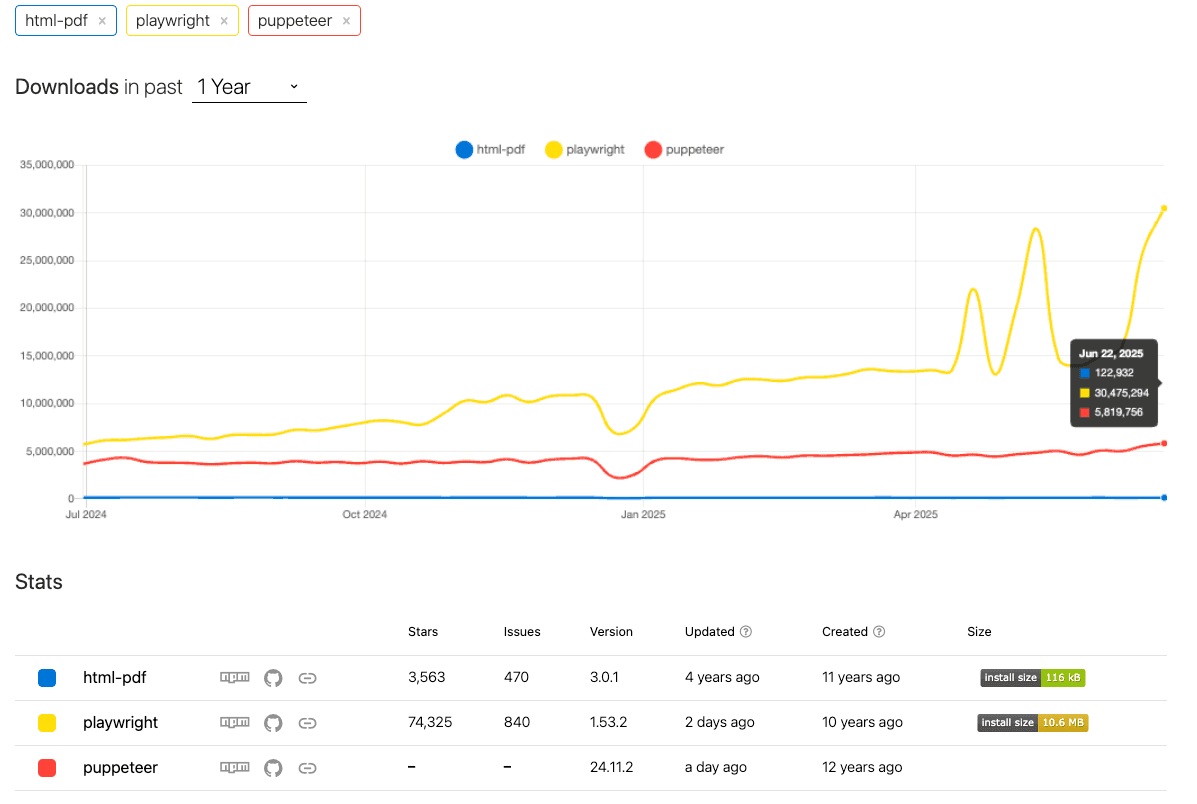
Playwright, maintained by Microsoft, is a modern browser automation library supporting Chromium, WebKit, and Firefox. Its popularity has skyrocketed, growing by 100% in recent months as shown by npmtrends.
Install Playwright via npm:
npm install playwrightConvert HTML to PDF using URL:
const { chromium } = require("playwright");

(async () => {
  const browser = await chromium.launch();
  const page = await browser.newPage();
  await page.goto("https://your-url.com");
  await page.pdf({
    path: "report.pdf",
    format: "A4",
    margin: { top: "1in", bottom: "1in" },
    displayHeaderFooter: true,
    headerTemplate: '<div style="font-size:10px;">Header Content</div>',
    footerTemplate:
      '<div style="font-size:10px;">Page <span class="pageNumber"></span> of <span class="totalPages"></span></div>',
  });
  await browser.close();
})();
Convert Pure HTML Content to PDF:
const { chromium } = require("playwright");

(async () => {
  const browser = await chromium.launch();
  const page = await browser.newPage();
  await page.setContent("<h1>Hello PDF!</h1><p>Generated from pure HTML.</p>");
  await page.pdf({ path: "html-content.pdf", format: "Letter" });
  await browser.close();
})();
Playwright’s detailed documentation and rapid community growth make it ideal for production environments. For further details, explore our full guide on converting HTML to PDF using Playwright in NodeJs.
Puppeteer
Puppeteer, developed by Google, leverages headless Chrome for accurate server-side HTML rendering to PDF.
Install Puppeteer via npm:
npm install puppeteerConvert HTML to PDF using URL:
const puppeteer = require("puppeteer");

(async () => {
  const browser = await puppeteer.launch();
  const page = await browser.newPage();
  await page.goto("https://your-url.com");
  await page.pdf({
    path: "report.pdf",
    format: "A4",
    printBackground: true,
    displayHeaderFooter: true,
    headerTemplate: '<span style="font-size:10px">Report Header</span>',
    footerTemplate:
      '<span style="font-size:10px">Page <span class="pageNumber"></span> / <span class="totalPages"></span></span>',
  });
  await browser.close();
})();
Convert Pure HTML Content to PDF:
const puppeteer = require("puppeteer");

(async () => {
  const browser = await puppeteer.launch();
  const page = await browser.newPage();
  await page.setContent("<h2>Pure HTML to PDF</h2><p>Quick conversion.</p>");
  await page.pdf({ path: "html-content.pdf", format: "A4" });
  await browser.close();
})();
Puppeteer is reliable and strongly supported by Google's ecosystem. For deeper insights, check our comprehensive [guide to Puppeteer for HTML to PDF conversion].
html-pdf
html-pdf leverages PhantomJS to convert HTML to PDF. Unfortunately, the project hasn't seen updates for over four years, stagnating significantly compared to modern tools. PhantomJS's WebKit engine also struggles with modern CSS and JavaScript and is depracted, so it's not recommended to use.
Install html-pdf via npm:
npm install html-pdfQuick conversion example:
const pdf = require("html-pdf");

const html = "<h1>Simple HTML to PDF</h1><p>Effortless conversion.</p>";
pdf
  .create(html, {
    format: "Letter",
    header: {
      height: "15mm",
      contents: '<span style="font-size:9px">Header content</span>',
    },
    footer: {
      height: "15mm",
      contents:
        '<span style="font-size:9px">Footer - Page {{page}}/{{pages}}</span>',
    },
  })
  .toFile("./simple-report.pdf", (err, res) => {
    if (err) return console.log(err);
    console.log(res);
  });
Ideal for basic scenarios, but unsuitable for complex or modern applications.
Comparison Table
| Feature | Playwright | Puppeteer | html-pdf |
|---|---|---|---|
| Rendering Engine | Chromium, WebKit or Firefox | Chromium or Firefox | PhantomJS (depracted) |
| Output Quality | Excellent (Pixel Perfect) | Excellent (Pixel Perfect) | Moderate (CSS limitations) |
| Ease of Use | Moderate | Moderate | Easy |
| CSS Support | Full | Full | Limited |
| Community Support | Excellent and growing | Excellent | Poor |
| Recommended Use | Complex PDFs and End to end testing | Complex PDFs | Simple PDFs |
Alternative: Generate PDFs with pdf noodle

Managing HTML-to-PDF conversion at scale can quickly become a nightmare!
Especially in serverless environments where cold starts, memory limits, and headless browser quirks love to break at the worst possible time (we even wrote a full article about it). Add constant template iterations, version control headaches, and the need to support non-technical contributors, and suddenly your “simple PDF library” turns into an ongoing engineering project.
pdf noodle eliminates all of that.
Instead of maintaining brittle infrastructure or wrestling with outdated pdf libraries, pdf noodle gives you a battle-tested HTML to PDF API that just works!
Fast, scalable, and designed for both developers and non-developers. You send raw HTML or use our AI-powered template builder, and pdf noodle handles the rendering, scaling, optimization, and delivery so your team doesn’t have to.
Here's an example of a simple API request to generate your pixel-perfect PDF with just a few lines of code:
curl -X POST https://api.pdfnoodle.com/v1/html-to-pdf/sync \
-H "Content-Type: application/json" \
-H "Authorization: Bearer your-api-key" \
-d '{"html":"<html>your-html-here"}'
pdf noodle also includes a powerful AI Agent that can generate PDF templates instantly, along with a modern editor for refining the design, also using AI, to match your brand. You don't need developing or design experience to quickly update layouts, adjust styling, and manage template versions.
Here’s a quick demo showing how it works:
You can create your account and design your first template without any upfront payment.
Conclusion
For precise HTML/CSS rendering and in-house projects, Playwright is highly recommended due to its impressive documentation and growth.
If you don't want to waste time maintaining pdfs layouts and their infrastructure or if you don't want to keep track of best practices to generate PDFs at scale, third-party PDF APIs like pdf noodle will save you hours of work and deliver a high quality pdf layout.
Try it yourself: Need a quick conversion without writing code? Use our convert HTML to PDF online — no signup required.


