


Introduction: Why iTextSharp?
iTextSharp is a robust PDF library for .NET, making it an excellent tool for generating PDF reports in SaaS applications, whether for invoices, summaries, or detailed documents. In this article, we’ll explore how to convert HTML to PDF using iTextSharp. By leveraging C# and this library, you’ll be able to integrate PDF generation seamlessly into your projects.
It’s available under AGPL or commercial licenses, so be mindful of licensing terms when building proprietary or enterprise solutions.
You can check out the full documentation here.
Comparison Between iTextSharp and Other C# PDF Libraries
When selecting a PDF library, it’s crucial to consider factors like functionality, ease of use, and licensing. Here’s how iTextSharp compares to other popular options:
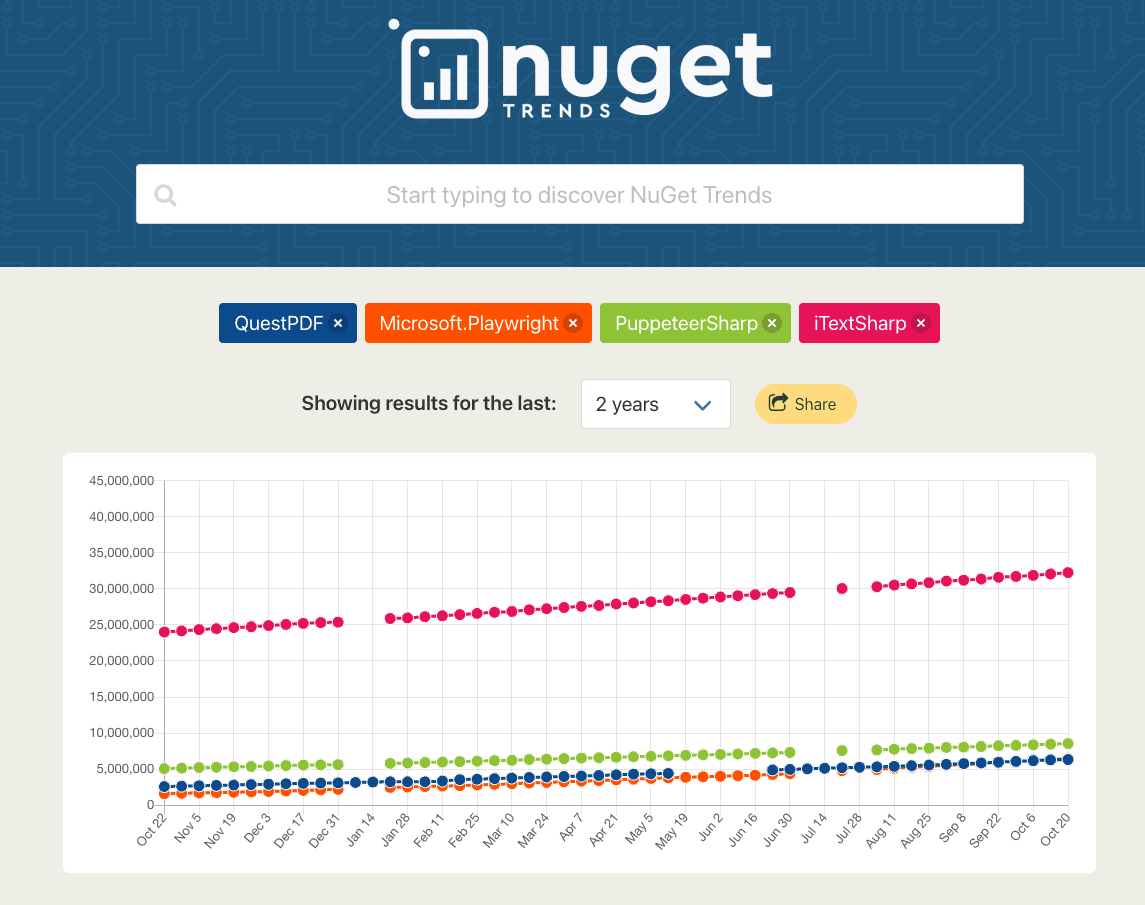
• iTextSharp: The most popular pdf library for C#. A feature-rich library supporting advanced PDF creation and manipulation. Ideal for complex tasks but requires attention to licensing for commercial use.
• PdfSharp: An open-source library suitable for basic PDF tasks. While it excels in creating PDFs from scratch, it lacks native support for HTML to PDF conversion without additional extensions.
• QuestPDF: A modern, open-source library offering a fluent API for building PDFs using C#. It excels at programmatic PDF generation but doesn’t natively support HTML to PDF conversion.
• PuppeteerSharp and Playwright: Headless browser tools that render HTML to PDF by simulating a browser environment. They handle modern HTML/CSS well but can introduce unnecessary overhead for simple tasks.
iTextSharp strikes a balance between functionality and performance, making it a solid choice for converting HTML to PDF in a .NET environment.
We also have a full comparison between C# PDF generation libraries, that you can check out here.
Setting Up iTextSharp in Your C# Project
Before diving into code, you’ll need to set up iTextSharp in your project.
Installing iTextSharp via NuGet in a .NET Environment
Use the NuGet Package Manager to install iTextSharp:
Install-Package iTextSharp -Version 5.5.13.3Or via the Package Manager Console:
PM> Install-Package iTextSharp -Version 5.5.13.3Ensure that your project targets a compatible .NET framework version.
Preparing Your Project for HTML to PDF Conversion
Add the necessary namespaces in your C# files:
using iTextSharp.text;
using iTextSharp.text.pdf;
using iTextSharp.tool.xml;
Verify that all dependencies are correctly referenced to avoid runtime issues.
Implementing HTML to PDF Conversion with iTextSharp
Let’s walk through creating a complete invoice in HTML/CSS and converting it to PDF.
Start by designing your invoice template in HTML:
<!DOCTYPE html>
<html>
  <head>

    <style>
              body { font-family: 'Segoe UI', Tahoma, Geneva, Verdana, sans-serif; }
              .invoice-box {
                  max-width: 800px;
                  margin: auto;
                  padding: 30px;
                  border: 1px solid #eee;
              }
              .invoice-header { text-align: center; margin-bottom: 50px; }
              .invoice-details { width: 100%; border-collapse: collapse; }
              .invoice-details th, .invoice-details td {
                  border: 1px solid #ddd;
                  padding: 8px;
              }
              .invoice-details th { background-color: #f2f2f2; }

    </style>
  </head>
  <body>

    <div class="invoice-box">

      <div class="invoice-header">

        <h1>{{ CompanyName }}</h1>

        <p>{{ Address }}</p>

      </div>

      <table class="invoice-details">

        <tr>

          <th>Description</th>

          <th>Quantity</th>

          <th>Price</th>

          <th>Total</th>

        </tr>
                    {% for item in Items %}
        <tr>

          <td>{{ item.Description }}</td>

          <td>{{ item.Quantity }}</td>

          <td>${{ item.Price }}</td>

          <td>${{ item.Total }}</td>

        </tr>
                    {% endfor %}
        <tr>

          <td colspan="3" style="text-align:right;">Subtotal</td>

          <td>${{ Subtotal }}</td>

        </tr>

        <tr>

          <td colspan="3" style="text-align:right;">Tax</td>

          <td>${{ Tax }}</td>

        </tr>

        <tr>

          <td colspan="3" style="text-align:right;">Total</td>

          <td>${{ Total }}</td>

        </tr>

      </table>

    </div>
  </body>
</html>
Save this HTML content as invoice_template.html.
Using Template Engines for Dynamic HTML Generation
To generate dynamic invoices populated with data, integrate a template engine like Razor or Scriban. This allows you to inject variables and loop over data structures.
Example with Scriban:
using Scriban;
string templateText = File.ReadAllText("invoice_template.html");
var template = Template.Parse(templateText);
var model = new {
    CompanyName = "Your Company",
    Address = "1234 Street, City, Country",
    Items = new[] {
        new { Description = "Product A", Quantity = 2, Price = 50, Total = 100 },
        new { Description = "Product B", Quantity = 1, Price = 75, Total = 75 }
    },
    Subtotal = 175,
    Tax = 17.5,
    Total = 192.5
};
string htmlContent = template.Render(model);
This approach enables you to create personalized invoices by passing different data models.
Writing C# Code to Convert HTML to PDF
Now, let’s write the C# code to convert the HTML content into a PDF document:
using System;
using System.IO;
using iTextSharp.text;
using iTextSharp.text.pdf;
using iTextSharp.tool.xml;
namespace PdfGenerator
{
    class Program
    {
        static void Main(string[] args)
        {
            string htmlContent = /* Your dynamic HTML content from the template engine */;
            using (FileStream stream = new FileStream("invoice.pdf", FileMode.Create))
            {
                Document pdfDoc = new Document(PageSize.A4, 25, 25, 30, 30);
                PdfWriter writer = PdfWriter.GetInstance(pdfDoc, stream);
                pdfDoc.Open();
                using (StringReader sr = new StringReader(htmlContent))
                {
                    XMLWorkerHelper.GetInstance().ParseXHtml(writer, pdfDoc, sr);
                }
                pdfDoc.Close();
                writer.Close();
            }
            Console.WriteLine("PDF generation completed successfully.");
        }
    }
}
Frequently asked questions
-
Why are my CSS styles missing? Ensure CSS is either inline or in the
<style>block within the HTML. iTextSharp’s XMLWorker can struggle with linked external styles unless you reference absolute URLs or embedded styles. -
How do I handle images? Use absolute paths or convert images to base64 for reliable rendering.
-
What about special characters or fonts? Specify the correct encoding (UTF-8) and embed fonts if you need special glyphs.
-
How can I improve performance for large documents? Consider streaming the PDF output and reusing iTextSharp objects if possible, or upgrading to iText7 which can offer better performance in some cases.
Alternative: Convert HTML to PDF Using pdf noodle

Managing HTML-to-PDF conversion at scale can quickly become a nightmare!
Especially in serverless environments where cold starts, memory limits, and headless browser quirks love to break at the worst possible time (we even wrote a full article about it). Add constant template iterations, version control headaches, and the need to support non-technical contributors, and suddenly your “simple PDF library” turns into an ongoing engineering project.
pdf noodle eliminates all of that.
Instead of maintaining brittle infrastructure or wrestling with outdated pdf libraries, pdf noodle gives you a battle-tested HTML to PDF API that just works!
Fast, scalable, and designed for both developers and non-developers. You send raw HTML or use our AI-powered template builder, and pdf noodle handles the rendering, scaling, optimization, and delivery so your team doesn’t have to.
Here's an example of a simple API request to generate your pixel-perfect PDF with just a few lines of code:
using System;
using System.Net.Http;
using System.Text;
using System.Threading.Tasks;

namespace PdfApiIntegration
{
    class Program
    {
        static async Task Main(string[] args)
        {
            var client = new HttpClient();
            client.DefaultRequestHeaders.Add("Authorization", "Bearer your-api-key");
            var requestBody = new
            {
                html = "<html>your-html...",
            };
            var content = new StringContent(
                Newtonsoft.Json.JsonConvert.SerializeObject(requestBody),
                Encoding.UTF8,
                "application/json"
            );
            var response = await client.PostAsync("https://api.pdfnoodle.com/v1/html-to-pdf/sync", content);
            if (response.IsSuccessStatusCode)
            {
                var pdfBytes = await response.Content.ReadAsByteArrayAsync();
                File.WriteAllBytes("invoice.pdf", pdfBytes);
                Console.WriteLine("PDF generated using PDFForge API.");
            }
            else
            {
                Console.WriteLine("Error generating PDF: " + response.ReasonPhrase);
            }
        }
    }
}
pdf noodle also includes a powerful AI Agent that can generate PDF templates instantly, along with a modern editor for refining the design, also using AI, to match your brand. You don't need developing or design experience to quickly update layouts, adjust styling, and manage template versions.
Here’s a quick demo showing how it works:
You can create your account and design your first template without any upfront payment.
Conclusion: Choosing the Right PDF Workflow
iTextSharp is a formidable .NET library for HTML-to-PDF conversion, offering strong customization and PDF manipulation features.
When to Use iTextSharp: If you need fine-grained PDF control (forms, annotations), or you prefer an AGPL-based solution.
When to Consider Alternatives:
- PuppeteerSharp for pixel-perfect rendering of modern CSS/JavaScript.
- QuestPDF for a fluent, code-based layout approach.
- PdfSharp for lightweight projects without heavy HTML needs.
If you don't want to waste time maintaining pdfs layouts and their infrastructure or if you don't want to keep track of best practices to generate PDFs at scale, third-party PDF APIs like pdf noodle will save you hours of work and deliver a high quality pdf layout.
Updated for 2025 to reflect the latest iTextSharp features and best practices.
Try it yourself: Need a quick conversion without writing code? Use our free HTML to PDF tool — no signup required.


