


Introduction to PDF Generation in Ruby on Rails with Prawn
Prawn, a powerful PDF library for Ruby, makes it possible to create PDF files with a rich variety of elements, providing a high degree of customization for specific document layouts. This is especially valuable for SaaS applications, where dynamically generated PDF reports are common.
You can check out their full documentation here.
Comparison Between Prawn and Other Ruby PDF Libraries
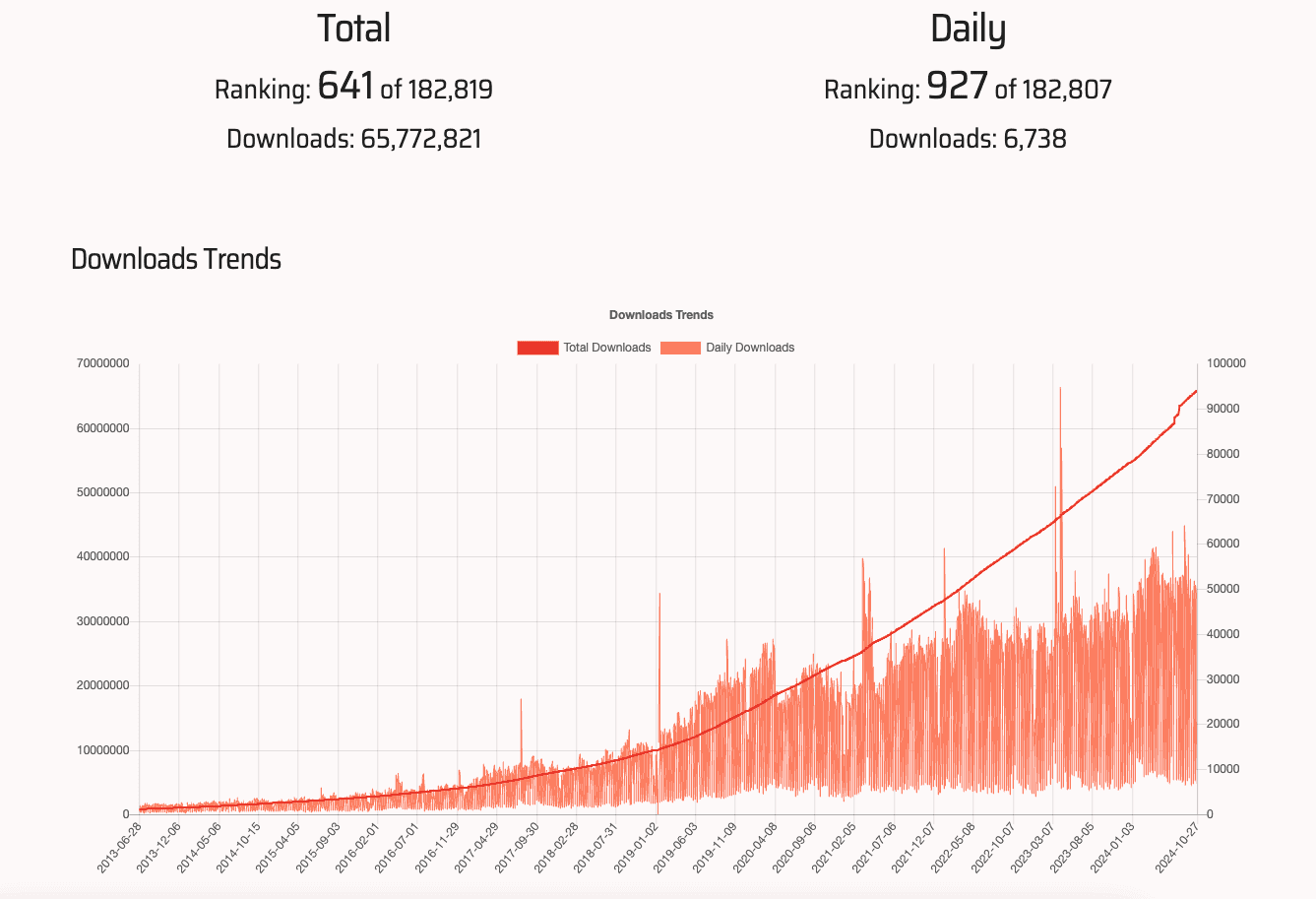
Other PDF libraries like HexaPDF, WickedPDF, PDFKit, and Grover are also popular in the Ruby community, each with its strengths:
• HexaPDF: Pure Ruby library for full PDF manipulation; ideal for in-depth customization, encryption, and annotations.
• WickedPDF & PDFKit: HTML-to-PDF conversion using wkhtmltopdf; best for rendering static HTML templates with minimal configuration.
• Grover & Puppeteer-Ruby: Chrome-based rendering with JavaScript support; suited for complex layouts and interactive content in PDFs.
In contrast, Prawn focuses on giving you complete control over document layout from scratch, making it perfect for those who need pixel-perfect design.
If you want to dig deeper on a comparison between Prawn and other Ruby pdf gems, we also have a detailed article with a full comparison between the best PDF gems for Ruby on rails in 2025.
Getting Started with Prawn for PDF Creation
Installing and Configuring Prawn for Ruby on Rails
To begin using Prawn, add it to your Gemfile and run bundle install. Once installed, Prawn can be used across Rails controllers or service objects:
# In your Gemfile
gem 'prawn'

# Run this to install
$ bundle install
With Prawn configured, you can call it within a controller or service object to create PDFs on demand.
Understanding Basic Prawn Syntax and PDF Structure
Prawn’s syntax is intuitive, using commands like text, image, and table to build PDF documents. A basic PDF layout in Prawn might look like this:
Prawn::Document.generate("example.pdf") do |pdf|
  pdf.text "Welcome to Prawn PDF Generation"
  pdf.image "/path/to/image.jpg", width: 100, height: 100
end
This code creates a simple PDF with text and an image, providing a foundation for more complex layouts.
Essential Prawn Methods for Text, Images, and Tables
To build out your documents, Prawn offers powerful methods for handling text, images, and tables:
Prawn::Document.generate("example.pdf") do |pdf|
  pdf.text "Invoice Report", size: 24, style: :bold
  pdf.text "Customer: John Doe", size: 14

  pdf.image "/path/to/logo.jpg", position: :center, width: 100, height: 50

  data = [["Item", "Quantity", "Price"], ["Widget", 2, "$20"], ["Gadget", 1, "$15"]]
  pdf.table(data, header: true)
end
This sample adds an invoice header, an image, and a table with headers, showcasing Prawn’s capacity for structured data layouts.
Styling and Formatting: Fonts, Colors, and Layouts
With Prawn, you control fonts, colors, and positioning, allowing fine-tuned customization. Here’s how to style text and elements:
Prawn::Document.generate("styled_example.pdf") do |pdf|
  pdf.font "Helvetica"
  pdf.fill_color "0096D6"
  pdf.text "Styled Invoice", size: 20, align: :center
  pdf.stroke_color "FF0000"
  pdf.stroke_horizontal_rule
end
This styling provides branding consistency, enhancing the document’s professional appearance.
Generating PDFs from HTML in Ruby on Rails
Creating a Complete Invoice HTML/CSS File as an Example
Start with a simple HTML file for an invoice template. This example will then be used to generate PDF files dynamically.
<!-- invoice.html.erb -->
<div class="invoice">

  <h1>Invoice Report</h1>

  <p>Customer: John Doe</p>

  <table>

    <thead>
      <tr>
        <th>Item</th>
        <th>Quantity</th>
        <th>Price</th>
      </tr>
    </thead>

    <tbody>

      <tr>
        <td>Widget</td>
        <td>2</td>
        <td>$20</td>
      </tr>

      <tr>
        <td>Gadget</td>
        <td>1</td>
        <td>$15</td>
      </tr>

    </tbody>

  </table>
</div>
Include CSS to style the HTML, ensuring it resembles the final PDF’s layout and appearance.
Creating the Invoice Example Using Prawn Methods
Using the HTML structure, recreate the invoice in Prawn to maintain layout consistency:
Prawn::Document.generate("invoice.pdf") do |pdf|
  pdf.text "Invoice Report", size: 20, style: :bold
  pdf.text "Customer: John Doe", size: 14

  items = [["Item", "Quantity", "Price"], ["Widget", 2, "$20"], ["Gadget", 1, "$15"]]
  pdf.table(items, header: true)
end
Integrating HTML Templates for Dynamic PDF Content
Dynamic content, such as variable customer information or item lists, can be integrated by passing data from the Rails controller:
# invoices_controller.rb
def show
  customer = Customer.find(params[:id])
  Prawn::Document.generate("invoice_#{customer.id}.pdf") do |pdf|
    pdf.text "Invoice for #{customer.name}"
  end
end
This integration allows flexible content generation directly from Rails models.
Using Prawn with Rails Views: Rendering HTML to PDF
Rendering an HTML view as a PDF in Rails involves generating HTML content, converting it, and applying Prawn’s PDF methods to structure it:
# invoices_controller.rb
def download_invoice
  respond_to do |format|
    format.html
    format.pdf do
      render pdf: "invoice",
             template: "invoices/show.html.erb",
             layout: 'pdf'
    end
  end
end
Adding Page Numbers, Headers, and Footers
Adding elements like page numbers enhances readability. With Prawn, footers and headers are easy to implement:
Prawn::Document.generate("invoice.pdf") do |pdf|
  pdf.number_pages "<page> of <total>", at: [pdf.bounds.right - 50, 0]
end
Creating Interactive Elements: Links and Buttons
Prawn supports clickable links for a more interactive PDF experience. Here’s how to add a link:
pdf.text "Visit our website", link: "https://example.com"Alternative: Convert HTML to PDF Using pdf noodle

Managing HTML-to-PDF conversion at scale can quickly become a nightmare!
Especially in serverless environments where cold starts, memory limits, and headless browser quirks love to break at the worst possible time (we even wrote a full article about it). Add constant template iterations, version control headaches, and the need to support non-technical contributors, and suddenly your “simple PDF library” turns into an ongoing engineering project.
pdf noodle eliminates all of that.
Instead of maintaining brittle infrastructure or wrestling with outdated pdf libraries, pdf noodle gives you a battle-tested PDF generation API that just works!
Fast, scalable, and designed for both developers and non-developers. You send raw HTML or use our AI-powered template builder, and pdf noodle handles the rendering, scaling, optimization, and delivery so your team doesn’t have to.
Here's an example of a simple API request to generate your pixel-perfect PDF with just a few lines of code:
require 'net/http'
require 'json'
require 'uri'

class PdfApiService
  def self.generate_pdf(html_content)
    uri = URI("https://api.pdfnoodle.com/v1/html-to-pdf/sync")
    http = Net::HTTP.new(uri.host, uri.port)
    http.use_ssl = true
    request = Net::HTTP::Post.new(uri.path, {
      'Content-Type' => 'application/json',
      'Authorization' => "Bearer your-api-key"
    })
    request.body = {
      html: html_content
    }.to_json
    response = http.request(request)
    response.body if response.is_a?(Net::HTTPSuccess)
  end
end
pdf noodle also includes a powerful AI Agent that can generate PDF templates instantly, along with a modern editor for refining the design, also using AI, to match your brand. You don't need developing or design experience to quickly update layouts, adjust styling, and manage template versions.
Here’s a quick demo showing how it works:
You can create your account and design your first template without any upfront payment.
Conclusion
For complete control over PDF layout, Prawn is an excellent tool in Ruby on Rails, particularly when fine-tuning and complex designs are needed.
When simpler HTML-to-PDF conversion suffices, consider alternatives like WickedPDF or PDFkit.
If you don't want to waste time maintaining pdfs layouts and their infrastructure or if you don't want to keep track of best practices to generate PDFs at scale, third-party PDF APIs like pdf noodle will save you hours of work and deliver a high quality pdf layout.
Try it yourself: Need a quick conversion without writing code? Use our free online HTML to PDF converter — no signup required.


