


An Introduction to PDFKit: a Python PDF Generation Library
PDFKit is a popular Python library that simplifies the process of converting HTML to PDF, providing an easy way to style your documents using familiar web technologies like HTML and CSS. In this guide, we’ll walk through setting up PDFKit, configuring it to generate PDF documents from HTML, and even handling more advanced use cases like dynamic content and asynchronous generation.
You can check out the pypi documentation here.
Comparing PDFKit with Other Python PDF Libraries
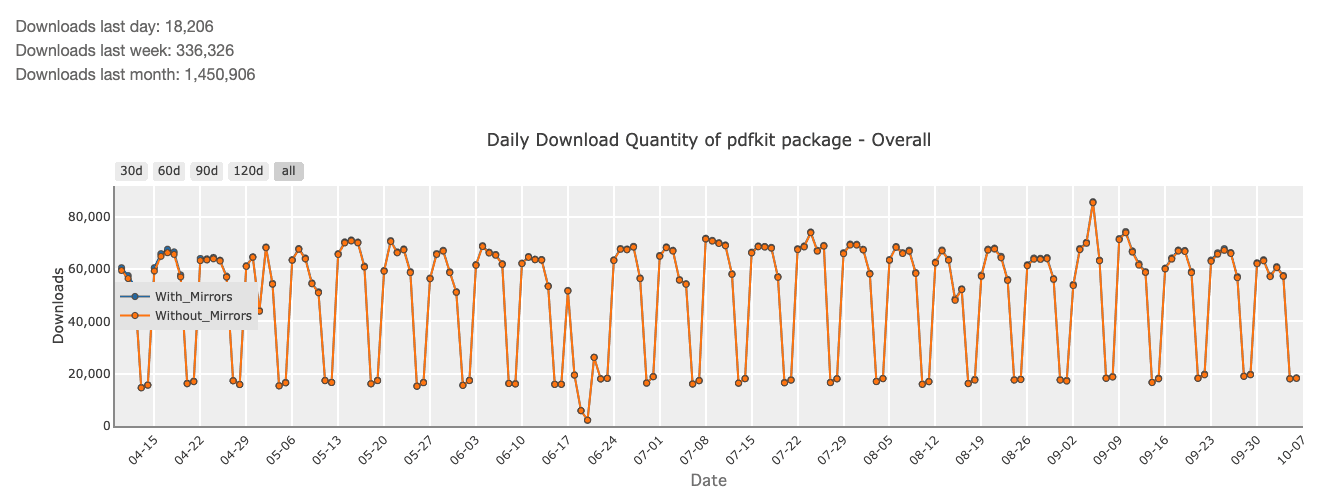
There are many Python libraries available for generating PDFs. Libraries like ReportLab (4,788,417 monthly downloads) and PyPDF2 (9,982,763 monthly downloads) offer powerful document creation tools, but they often require manually defining document structure and layout. This can become cumbersome, especially if you’re more familiar with HTML and CSS.
PDFKit, on the other hand, excels by leveraging wkhtmltopdf, which converts HTML content directly into PDF. This allows you to use existing HTML templates, making it much easier to maintain and style your documents. While other libraries might provide lower-level control over PDF creation, PDFKit offers simplicity, leveraging familiar web technologies.
If you want to dig deeper on a comparison between Python-PDFKIT and other python pdf libraries, we also have a detailed article with a full comparison between the best PDF libraries for python in 2025.
Setting Up Python-PDFKit for HTML to PDF Conversion
Installing PDFKit and Dependencies for a Smooth Setup
To start using PDFKit, you’ll first need to install both the pdfkit Python package and the wkhtmltopdf binary, which handles the heavy lifting of converting HTML to PDF. Start by installing the necessary dependencies:
pip install pdfkitFor wkhtmltopdf, you’ll need to install it separately based on your OS. On Ubuntu, for instance, you can install it via:
sudo apt-get install wkhtmltopdfOn macOS, you can use Homebrew:
brew install wkhtmltopdfOnce both are installed, PDFKit is ready to use. If you encounter issues with the installation, ensure that wkhtmltopdf is correctly configured in your system’s PATH.
Configuring wkhtmltopdf: The Engine Behind Python-PDFKit
wkhtmltopdf is the core engine that powers PDFKit, translating your HTML and CSS into a PDF file. For a smooth experience, make sure you configure the path to wkhtmltopdf correctly in your code. You can set the path manually if necessary:
import pdfkit
pdfkit_config = pdfkit.configuration(wkhtmltopdf='/usr/local/bin/wkhtmltopdf')
pdfkit.from_file('example.html', 'output.pdf', configuration=pdfkit_config)
By explicitly defining the path, you avoid potential issues with the binary not being found, especially in different environments like Docker or cloud servers.
Key Features of Python-PDFKit You Should Know
PDFKit allows you to generate PDFs from URLs, strings, or files. It provides extensive options for customizing the conversion process, such as setting margins, page sizes, and header/footer content.
Some key features include:
• Ability to convert HTML files, strings, or web pages.
• Support for custom page settings, like orientation and margins.
• Options for embedding metadata, like title, subject, and author.
• Advanced control over CSS for precise styling.
Essential Python Code Snippets to Convert HTML to PDF
Here’s an example of converting a simple HTML file to PDF using PDFKit:
import pdfkit
# Convert a local HTML file to PDF
pdfkit.from_file('example.html', 'output.pdf')
# Convert an HTML string directly to PDF
html_string = '<h1>Invoice</h1><p>This is an invoice for your order.</p>'
pdfkit.from_string(html_string, 'invoice.pdf')
# Convert a webpage to PDF
pdfkit.from_url('http://example.com', 'webpage.pdf')
With just a few lines of code, PDFKit handles the heavy lifting of transforming your HTML content into a polished PDF document.
Step-by-Step Guide: Generating PDFs from HTML Using PDFKit
Creating a Complete Invoice HTML/CSS File for Example
Let’s walk through creating an invoice PDF from an HTML template. Below is a basic example of an HTML invoice:
<!DOCTYPE html>
<html lang="en">
  <head>

    <meta charset="UTF-8" />

    <meta name="viewport" content="width=device-width, initial-scale=1.0" />

    <title>Invoice</title>

    <style>
              body { font-family: Arial, sans-serif; }
              .invoice-box { max-width: 800px; margin: auto; padding: 30px; }
              .invoice-table { width: 100%; border-collapse: collapse; }
              .invoice-table th, .invoice-table td { padding: 8px; border-bottom: 1px solid #ddd; }

    </style>
  </head>
  <body>

    <div class="invoice-box">

      <h1>Invoice</h1>

      <p>Invoice Date: {{ invoice_date }}</p>

      <p>Invoice #: {{ invoice_number }}</p>

      <table class="invoice-table">

        <thead>

          <tr>

            <th>Item</th>

            <th>Quantity</th>

            <th>Price</th>

          </tr>

        </thead>

        <tbody>

          <tr>

            <td>Product 1</td>

            <td>2</td>

            <td>$200</td>

          </tr>

        </tbody>

      </table>

    </div>
  </body>
</html>
This HTML template defines the structure of the invoice and includes placeholders for dynamic content such as the invoice date and number.
Using PDFKit to Render HTML and Convert It to a PDF
Once you’ve designed the HTML template, converting it into a PDF with PDFKit is straightforward:
import pdfkit
pdfkit.from_file('invoice.html', 'invoice.pdf')
The result is a PDF file styled according to your HTML and CSS. You can customize this further by passing additional options to wkhtmltopdf, like page size or orientation:
options = {
    'page-size': 'Letter',
    'orientation': 'Portrait',
    'margin-top': '10mm',
    'margin-bottom': '10mm',
    'margin-left': '10mm',
    'margin-right': '10mm',
}
pdfkit.from_file('invoice.html', 'invoice.pdf', options=options)
Styling PDFs: Managing CSS for Professional-Looking Documents
One of the benefits of using HTML/CSS for PDF generation is that you can leverage all the power of CSS to style your documents. You can create tables, adjust font sizes, apply background colors, and more. Ensure your stylesheets are correctly linked in the HTML:
<link rel="stylesheet" href="styles.css" />This allows for clean separation of content and design, making it easier to maintain and update your PDFs.
Dynamic Data with HTML Template Engine
For dynamic content like invoices, you can use a templating engine like Jinja2 to populate your HTML template with data:
from jinja2 import Template
template = Template(open('invoice_template.html').read())
html_content = template.render(invoice_date='2024-10-10', invoice_number='12345')
pdfkit.from_string(html_content, 'dynamic_invoice.pdf')
Using Jinja2 ensures that you can dynamically generate content for each PDF without manually editing the HTML file.
Improving Performance: Asynchronous PDF Generation in Python
In high-traffic applications, generating PDFs synchronously might create bottlenecks. You can offload this task by using asynchronous Python libraries like Celery to generate PDFs in the background, improving performance and user experience:
from celery import Celery
app = Celery('tasks', broker='redis://localhost:6379/0')
@app.task
def generate_pdf_async(html):
    pdfkit.from_string(html, 'output.pdf')
This approach ensures scalability by allowing your application to handle PDF generation as a background process.
Debugging Common Issues When Converting HTML to PDF with PDFKit
Sometimes, HTML elements might not render as expected in your PDF. This could be due to unsupported CSS properties in wkhtmltopdf. Use the --debug-javascript flag to help identify issues with JavaScript execution, and ensure that all assets like fonts or images are correctly loaded.
Alternative: Convert HTML to PDF Using pdf noodle

Managing HTML-to-PDF conversion at scale can quickly become a nightmare!
Especially in serverless environments where cold starts, memory limits, and headless browser quirks love to break at the worst possible time (we even wrote a full article about it). Add constant template iterations, version control headaches, and the need to support non-technical contributors, and suddenly your “simple PDF library” turns into an ongoing engineering project.
pdf noodle eliminates all of that.
Instead of maintaining brittle infrastructure or wrestling with outdated pdf libraries, pdf noodle gives you a battle-tested PDF generation API that just works!
Fast, scalable, and designed for both developers and non-developers. You send raw HTML or use our AI-powered template builder, and pdf noodle handles the rendering, scaling, optimization, and delivery so your team doesn’t have to.
Here's an example of a simple API request to generate your pixel-perfect PDF with just a few lines of code:
import requests

url = 'https://api.pdfnoodle.com/v1/html-to-pdf/sync'
payload = {
    "html": "<html>...your-html-here",
}
headers = {"Authorization": "Bearer YOUR_API_KEY"}

response = requests.post(url, json=payload, headers=headers)

with open('invoice.pdf', 'wb') as f:
    f.write(response.content)
pdf noodle also includes a powerful AI Agent that can generate PDF templates instantly, along with a modern editor for refining the design, also using AI, to match your brand. You don't need developing or design experience to quickly update layouts, adjust styling, and manage template versions.
Here’s a quick demo showing how it works:
You can create your account and design your first template without any upfront payment.
Conclusion
PDFKit is an excellent choice for generating PDFs from HTML when you need flexibility and ease of use in your SaaS application. However, if you don't want to waste time maintaining pdfs layouts and their infrastructure or if you don't want to keep track of best practices to generate PDFs at scale, third-party PDF APIs like pdf noodle will save you hours of work and deliver a high quality pdf layout.
Try it yourself: Need a quick conversion without writing code? Use our free HTML to PDF converter — no signup required.


