


Overview of React-PDF: A Powerful PDF Library for React
Generating PDF reports from HTML or app data is a common requirement in modern SaaS applications, from invoices and receipts to dashboards and analytics. React-PDF is an open-source library that makes this process seamless by allowing developers to create and export PDFs directly from React components.
Instead of relying on manual HTML-to-PDF conversions, React-PDF lets you use React’s declarative syntax to design structured, dynamic documents, just like building a normal user interface. Built on top of PDFKit, it combines the reliability of a proven PDF engine with the flexibility of React, offering a clean and intuitive API for React to PDF generation at any scale.
They have a well structured documentation that you can check out here.
Comparing React-PDF with Other PDF Libraries
When selecting a PDF generation tool, it’s essential to understand how React-PDF stacks up against other libraries. PDF tools generally fall into two categories: canvas-like libraries and browser-oriented libraries.
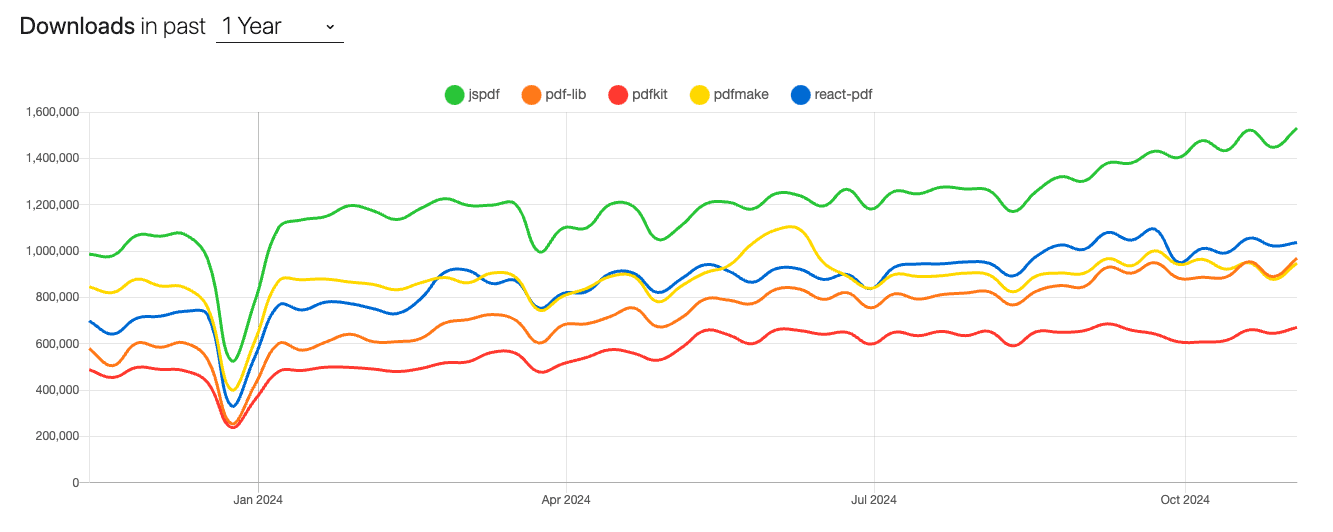
Canvas-Like PDF Libraries:
- pdf-lib: A lightweight library for creating and modifying PDFs in JavaScript without external dependencies.
- PDFKit: A feature-rich PDF generation library for Node.js, offering low-level control over PDF creation.
- pdfmake: Allows creation of PDFs using a declarative syntax, suitable for both Node.js and browser environments.
- jsPDF: A client-side library for generating PDFs directly in web browsers.
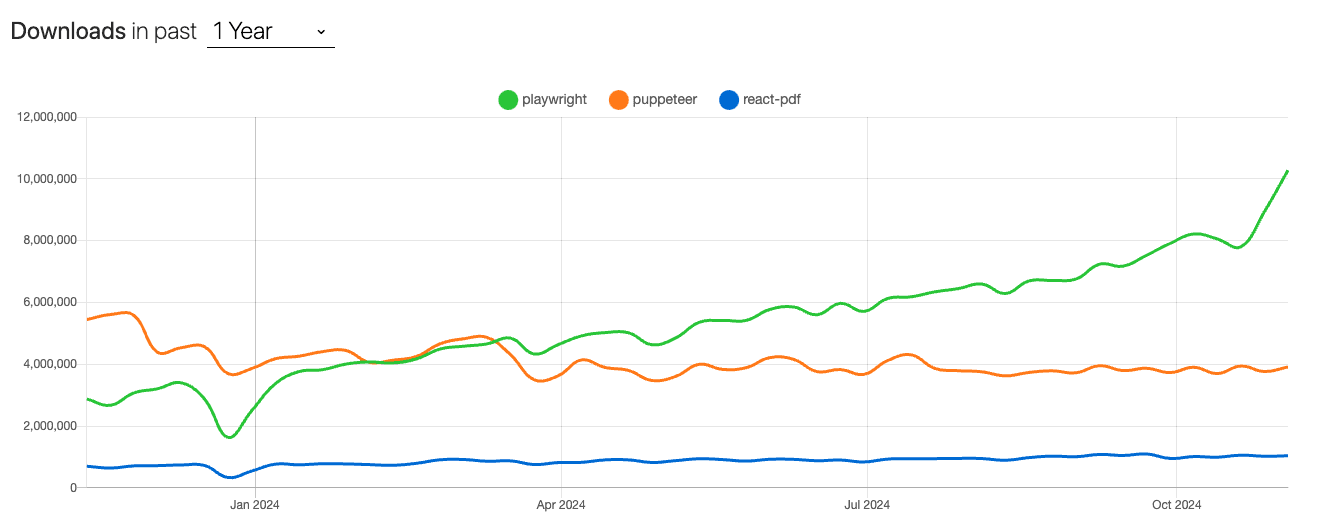
Browser-Oriented Libraries:
- Puppeteer: A Node.js library providing a high-level API to control Chrome or Chromium over the DevTools Protocol.
- Playwright: Similar to Puppeteer but supports multiple browsers, including Chromium, Firefox, and WebKit.
React-PDF distinguishes itself by combining the declarative nature of React with the power of PDFKit. This synergy allows for seamless integration within React applications, making the process of converting HTML to PDF more intuitive and maintainable.
If you want to dig deeper on a comparison between React-PDF and other NodeJs pdf libraries, we also have a detailed article with a full comparison between the best PDF libraries for NodeJs in 2025.
Setting Up Your Project with React-PDF
To start using React-PDF for PDF generation, make sure you have Node.js and npm installed. Then create a new React project and add the @react-pdf/renderer package, which provides all the tools needed to create PDFs directly from React components.
npx create-react-app react-pdf-generator
cd react-pdf-generator
npm install @react-pdf/renderer
Your project structure might look like this:
react-pdf-generator/
├── src/
│ ├── components/
│ │ └── Invoice.js
│ ├── App.js
│ └── index.js
├── package.json
└── README.md
React to PDF: How to Generate PDFs in React with React-PDF
The @react-pdf/renderer library lets you write JSX components that render into real PDF documents.
Think of it as React’s declarative style applied to PDF creation — you use <Document>, <Page>, <View>, and <Text> elements instead of <div> and <span>.
Quick Start: React Create PDF with @react-pdf/renderer
1. Install and Scaffold
After installation, import the components you’ll need:
import React from "react";
import {
  Document,
  Page,
  Text,
  View,
  PDFDownloadLink,
} from "@react-pdf/renderer";
2. Minimal “Hello PDF” Component
Create a simple HelloPDF.js inside src/components:
// src/components/HelloPDF.js
import React from 'react';
import { Document, Page, Text, StyleSheet } from '@react-pdf/renderer';

const styles = StyleSheet.create({
page: { flexDirection: 'column', alignItems: 'center', justifyContent: 'center' },
text: { fontSize: 16, color: '#333' },
});

const HelloPDF = () => (
<Document>
<Page size="A4" style={styles.page}>
<Text style={styles.text}>Hello from React to PDF!</Text>
</Page>
</Document>
);

export default HelloPDF;
Then in App.js:
import React from "react";
import { PDFDownloadLink } from "@react-pdf/renderer";
import HelloPDF from "./components/HelloPDF";

function App() {
  return (
    <div>
      <h1>React Create PDF Example</h1>
      <PDFDownloadLink document={<HelloPDF />} fileName="hello.pdf">
        {({ loading }) => (loading ? "Preparing PDF..." : "Download PDF")}
      </PDFDownloadLink>
    </div>
  );
}

export default App;
✅ Run npm start and click Download PDF. You just created your first document using React to PDF.
Build a Real Template: Invoice Example with Flexbox Layout
Now let’s build a professional invoice template that uses real data and layout control with Flexbox.
Header and Meta Block
// src/components/Invoice.js
import React from 'react';
import { Document, Page, Text, View, StyleSheet } from '@react-pdf/renderer';

const styles = StyleSheet.create({
  page: { padding: 30 },
  header: { borderBottomWidth: 1, borderBottomColor: '#ddd', marginBottom: 20 },
  title: { fontSize: 22, fontWeight: 'bold' },
  section: { marginBottom: 12 },
  row: { flexDirection: 'row', justifyContent: 'space-between' },
  label: { fontWeight: 'bold' },
});

const Invoice = ({ data }) => (
  <Document>
    <Page style={styles.page}>
      <View style={styles.header}>
        <Text style={styles.title}>Invoice</Text>
      </View>

      <View style={styles.section}>
        <View style={styles.row}>
          <Text style={styles.label}>Invoice #:</Text>
          <Text>{data.invoiceNumber}</Text>
        </View>
        <View style={styles.row}>
          <Text style={styles.label}>Client:</Text>
          <Text>{data.clientName}</Text>
        </View>
      </View>
Line Items Table and Totals
      <View style={{ borderWidth: 1, borderColor: '#eee', marginBottom: 12 }}>
        {data.items.map((item, index) => (
          <View key={index} style={[styles.row, { padding: 6 }]}>
            <Text>{item.description}</Text>
            <Text>${item.price.toFixed(2)}</Text>
          </View>
        ))}
      </View>

      <View style={styles.row}>
        <Text style={styles.label}>Total:</Text>
        <Text>
          $
          {data.items
            .reduce((sum, item) => sum + item.price, 0)
            .toFixed(2)}
        </Text>
      </View>
    </Page>
  </Document>
);

export default Invoice;
Download via PDFDownloadLink
import { PDFDownloadLink } from "@react-pdf/renderer";
import Invoice from "./components/Invoice";
import invoiceData from "./data/invoiceData";

function App() {
  return (
    <div>
      <h1>Generate PDF from React</h1>
      <PDFDownloadLink
        document={<Invoice data={invoiceData} />}
        fileName="invoice.pdf"
      >
        {({ loading }) => (loading ? "Creating PDF..." : "Download Invoice")}
      </PDFDownloadLink>
    </div>
  );
}
Fonts in React-PDF: Font.register and the format Property
React-PDF allows custom font registration through the Font API.
This is especially useful when you need consistent branding or multi-language support.
// src/fonts/registerFonts.js
import { Font } from "@react-pdf/renderer";

Font.register({
  family: "Inter",
  src: "/fonts/Inter-Regular.woff2",
  format: "woff2", // react-pdf/renderer Font.register format property
});

Font.register({
  family: "Inter",
  fonts: [
    { src: "/fonts/Inter-Bold.woff2", fontWeight: "bold", format: "woff2" },
    { src: "/fonts/Inter-Italic.woff", fontStyle: "italic", format: "woff" },
  ],
});
✅ Use the registered family inside your styles:
const styles = StyleSheet.create({
title: { fontFamily: 'Inter', fontSize: 20, fontWeight: 'bold' },
});
Tip: Supported formats include woff2, woff, truetype, and opentype. Keep fonts inside /public/fonts or host them from a CDN.
Does React-PDF Render HTML? Understanding React PDF vs HTML PDF
It’s common to confuse React-PDF with HTML-to-PDF converters.
React-PDF does not render raw HTML or CSS. It transforms React components into PDF pages using the PDFKit engine.
If you actually need to convert HTML to PDF in React, you have two main options:
- Headless browsers like Playwright or Puppeteer — ideal for pixel-perfect rendering.
- HTML-to-React-PDF mappers that parse a limited subset of HTML tags into React-PDF components.
Example (simplified HTML-to-React mapping):
import { Document, Page, Text, View } from "@react-pdf/renderer";
import { parse } from "node-html-parser";

const htmlToPdfNodes = (html) => {
  const root = parse(html);
  return root.childNodes.map((node, i) => <Text key={i}>{node.rawText}</Text>);
};

const HtmlDocument = ({ html }) => (
  <Document>
    <Page>
      <View>{htmlToPdfNodes(html)}</View>
    </Page>
  </Document>
);
For production use, headless browsers or APIs like pdf noodle are better for rendering complex HTML layouts with CSS.
Server-Side Rendering: Generate PDF from React on Node (Streaming)
React-PDF also supports server-side PDF generation for automation or batch exports.
Install the Node renderer:
npm install @react-pdf/nodeThen create a lightweight Express server:
// server.js
import express from "express";
import React from "react";
import { renderToStream } from "@react-pdf/node";
import Invoice from "./src/components/Invoice.js";
import invoiceData from "./src/data/invoiceData.js";

const app = express();

app.get("/invoice", async (req, res) => {
  try {
    const element = React.createElement(Invoice, { data: invoiceData });
    const pdfStream = await renderToStream(element);
    res.setHeader("Content-Type", "application/pdf");
    pdfStream.pipe(res);
  } catch (err) {
    console.error(err);
    res.status(500).send("Error generating PDF");
  }
});

app.listen(3000, () => console.log("PDF server running on port 3000"));
✅ This approach streams PDF files directly to clients — perfect for invoices, reports, or downloadable receipts.
Next Steps:
If you need HTML-to-PDF at scale with full CSS and templates, integrate a PDF API like pdf noodle.
You’ll get the best of both worlds: the flexibility of React on the frontend and automated PDF rendering at scale.
Alternative: Convert HTML to PDF Using pdf noodle

Managing HTML-to-PDF conversion at scale can quickly become a nightmare!
Especially in serverless environments where cold starts, memory limits, and headless browser quirks love to break at the worst possible time (we even wrote a full article about it). Add constant template iterations, version control headaches, and the need to support non-technical contributors, and suddenly your “simple PDF library” turns into an ongoing engineering project.
pdf noodle eliminates all of that.
Instead of maintaining brittle infrastructure or wrestling with outdated pdf libraries, pdf noodle gives you a battle-tested PDF generation API that just works!
Fast, scalable, and designed for both developers and non-developers. You send raw HTML or use our AI-powered template builder, and pdf noodle handles the rendering, scaling, optimization, and delivery so your team doesn’t have to.
Here's an example of a simple API request to generate your pixel-perfect PDF with just a few lines of code:
fetch('https://api.pdfnoodle.com/v1/html-to-pdf/sync', {
  method: 'POST',
  body: JSON.stringify({ html:'your-html' }),
  headers: { 'Authorization' : 'Bearer your-api-key' }
});
pdf noodle also includes a powerful AI Agent that can generate PDF templates instantly, along with a modern editor for refining the design, also using AI, to match your brand. You don't need developing or design experience to quickly update layouts, adjust styling, and manage template versions.
Here’s a quick demo showing how it works:
You can create your account and design your first template without any upfront payment.
Conclusion
React-PDF offers a powerful solution for generating PDF reports from HTML in React applications. Its integration with PDFKit and use of React components make it an excellent choice for developers seeking a declarative and intuitive approach.
However, React-PDF may not suit all scenarios. If you require low-level control over PDF structures or need to convert complex HTML directly, alternatives like pdf-lib or browser-oriented libraries like Puppeteer and Playwright might be more appropriate.
If you don't want to waste time maintaining pdfs layouts and their infrastructure or if you don't want to keep track of best practices to generate PDFs at scale, third-party PDF APIs like pdf noodle will save you hours of work and deliver a high quality pdf layout.
Try it yourself: Need a quick conversion without writing code? Use our convert HTML to PDF online for free — no signup required.


