


Who is this guide for?
In 2025, many teams find themselves reevaluating their PDF generation tools. Traditional PDF generation libraries and SaaS solutions often introduce unnecessary complexity, maintenance headaches, and scalability limitations. Organizations require flexible, scalable solutions that reduce dependency on developer resources while offering seamless integrations.
pdf noodle is a modern AI-first PDF generation platform designed specifically for software developers, no-code builders, product managers and SaaS providers. It harnesses advanced technology and intuitive design so you can create beautiful, professional and dynamic PDFs in minutes.
Compatibility with Existing PDF Solutions
pdf noodle ensures a seamless transition regardless of your current PDF generation stack. Popular libraries and APIs such as Puppeteer, jspdf, Flying Saucer, pdfmake, iText, DomPDF, PDFKit, APITemplate, PDFMonkey, CraftMyPDF, and PDF Generator API are fully supported.
Whether migrating from code-heavy custom scripts, legacy SaaS solutions, or no-code and low-code platforms, pdf noodle uses AI to effortlessly replicate your existing PDF designs into ready-to-use templates in just a few minutes.
Step-by-Step Migration Process
Step 1: Set Up Your pdf noodle Account
Create a free trial account and go through the onboarding flow. You'll reach the template builder in a couple of clicks.
Step 2: Upload Your Existing Template
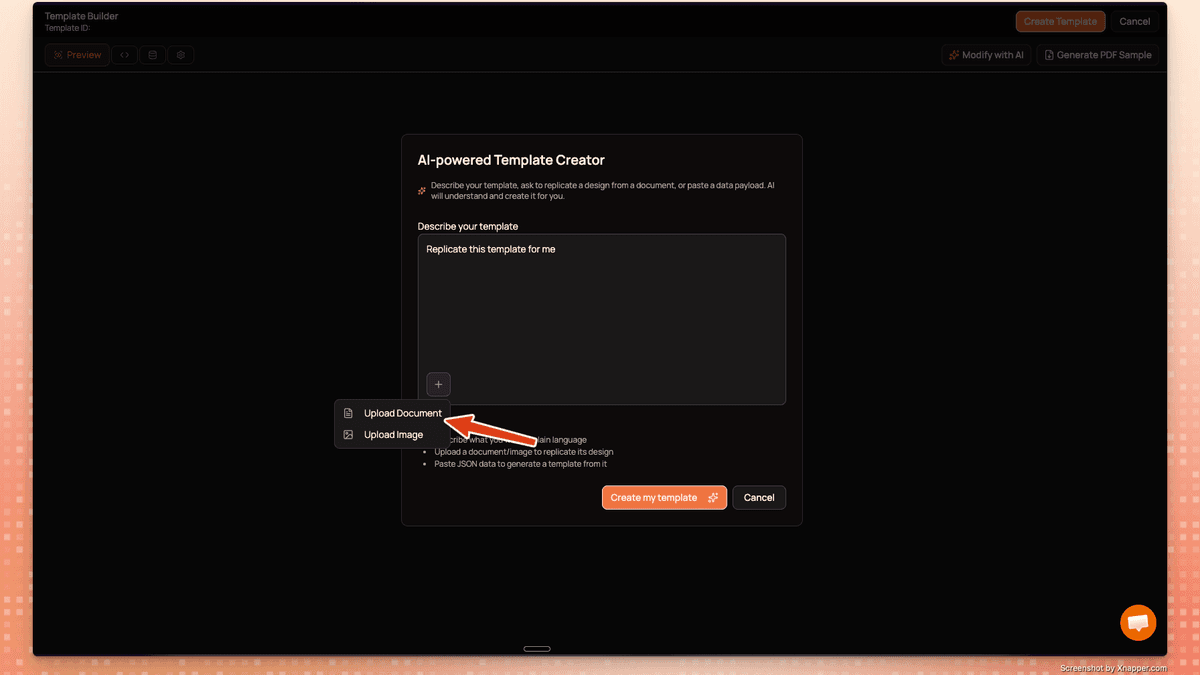
In the template builder, click "Create Template" to open the AI-powered Template Creator. Here you have two options:
- Upload a PDF document of your current template as a reference
- Upload a screenshot of your existing report or document
Simply click the + button, choose "Upload Document" or "Upload Image", and ask the AI to replicate your template. The AI will understand the design and recreate it for you automatically.
Step 3: Refine Your Template with AI
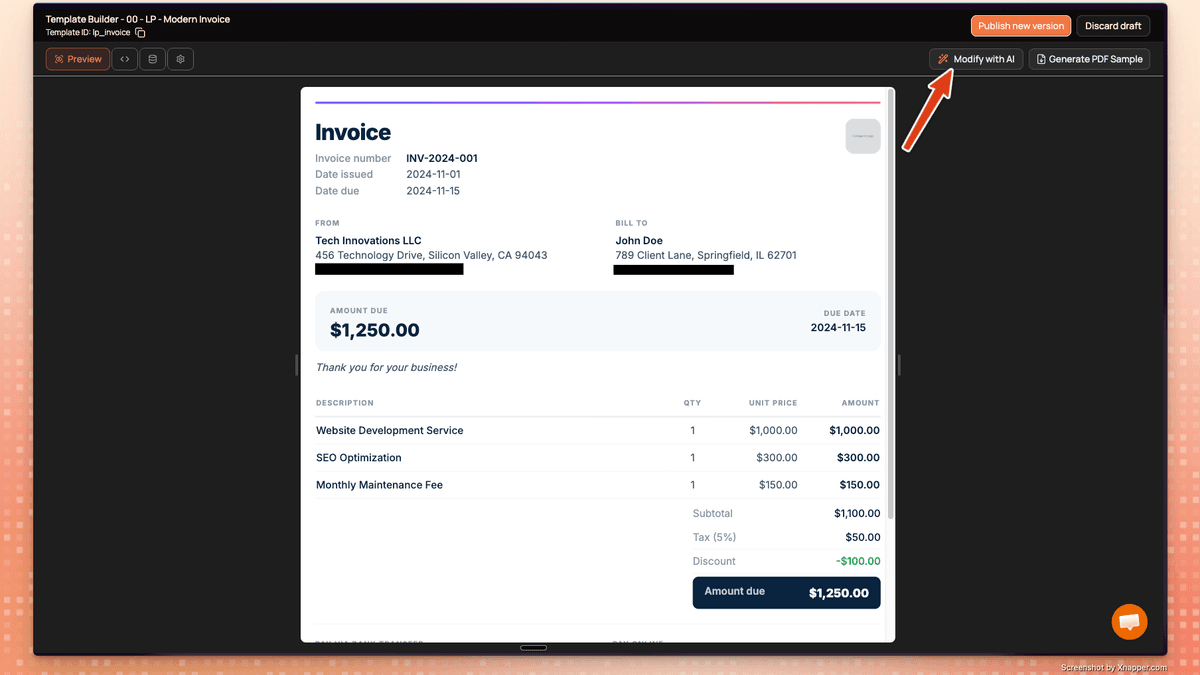
Once the AI creates your template, you can preview it and make adjustments. Use the "Modify with AI" button to refine the design by simply describing what you want to change in plain language. No need to touch any code — just talk to the AI and it will update the template for you.
Step 4: Implement with Your API Key
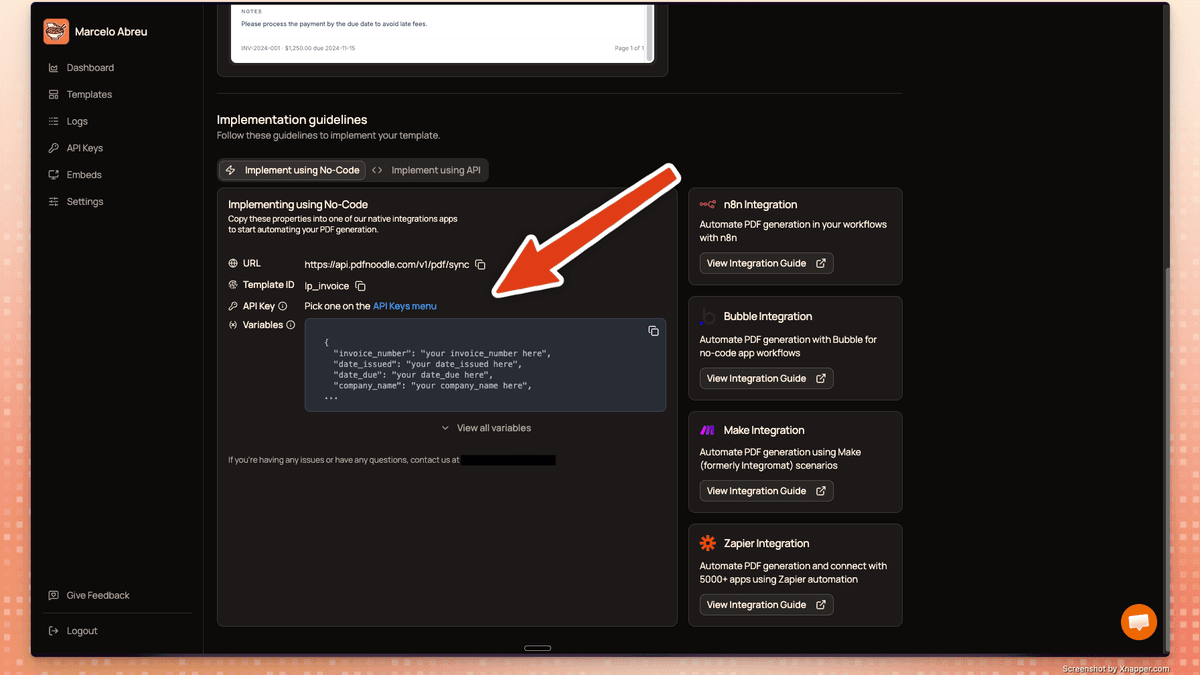
Once your template is ready, head to the Implementation guidelines section. pdf noodle gives you everything you need to start generating PDFs right away:
- Your API endpoint URL
- Your Template ID
- A link to grab your API Key
- The variables your template expects
You can implement using our no-code integrations (n8n, Bubble, Make, Zapier), our Node SDK, or a simple API call.
Integration Guides:
- Automate PDF Generation on n8n
- Automate PDF Generation on Make
- Automate PDF Generation on Zapier
- Automate PDF Generation on Bubble
Node.js SDK Example (see full SDK documentation):
import { PdfNoodle } from 'pdfnoodle';

const pdfnoodle = new PdfNoodle('pdfnoodle_api_...');

const { data } = await pdfnoodle.pdf.fromTemplate({
  templateId: 'inv_2f8a4b',
  data: {
    company: 'Acme Corp',
    items: [
      { description: 'Consulting', amount: 4500 },
      { description: 'Development', amount: 12000 },
    ],
    total: 16500,
  },
});
Frequently asked questions
-
How long does migration take? Most teams migrate a template in under 5 minutes. Upload your existing PDF or screenshot, let the AI replicate it, refine if needed, and you're ready to generate via API. Even complex templates with dynamic tables and multiple variables rarely take more than 10 minutes.
-
Will my PDF output look the same? Yes. The AI replicates your existing design faithfully — layout, fonts, spacing, and structure. Once the template is created, you can preview it side-by-side with your original and use the "Modify with AI" button to fine-tune any details until it matches exactly.
-
Can I reuse my existing HTML templates? Absolutely. You can paste your HTML directly into an HTML component in the template builder. But the fastest path is to upload your current PDF or a screenshot and let the AI recreate it for you — no code required.
-
Do I need to rewrite my API integration code? The API call itself is different, but it's simpler. You'll swap your current API call for a single request to pdf noodle's endpoint with your template ID and variables. We provide a Node SDK, Python SDK, PHP SDK, and a REST API. Most developers complete the integration swap in a few minutes.
-
How does pdf noodle handle dynamic data? We have built-in components for dynamic data like tables, charts, and code blocks. Your template variables are automatically detected and listed in the implementation guidelines, so you know exactly what data to send via API or no-code integration.
-
Can I automate document delivery and storage? Yes. pdf noodle integrates with n8n, Make, Zapier, and Pipedream, so you can connect PDF generation to email, Slack, Amazon S3, Google Drive, and thousands of other tools without writing code.
-
Is migration support or onboarding assistance available? Yes, you can reach us via the in-app support chat anytime. If you're on the business or scale plan, our dedicated team will help ensure a smooth transition.
-
Can I perform bulk migrations? You'll need to create templates one by one in the builder. If you have more than 5 templates to migrate, just message us and we'll help you get through them quickly.


